Test Online Free Microsoft PL-100 Exam Questions and Answers
Practice a live sample before buying full access. This page keeps the free PL-100 question set organized by page so visitors and search engines can reach the canonical -questions.html URL directly.
HOTSPOT
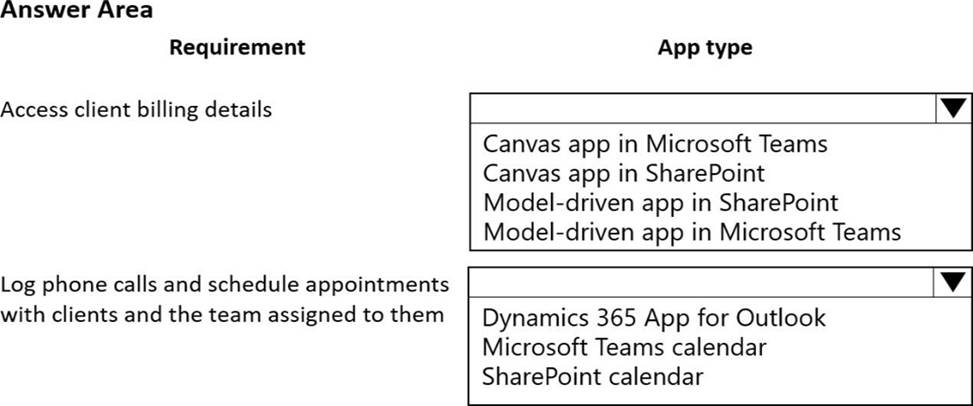
You are a technical assistant for a legal services organization. The company uses SharePoint to manage documents and Microsoft Dataverse as the data store. The company has strict rules about access, permissions, and privacy.
Lawyers and paralegals use Microsoft Teams for communications and collaboration. Employees use personal devices to access legal files. You do not have access to the admin area in Microsoft Power Platform.
You need to ensure that these rules are observed consistently and managed in one place.
Which type of app should you create? To answer, select the appropriate options in the answer area. NOTE: Each correct selection is worth one point.
Answer:
Explanation:
Graphical user interface, text, application
Description automatically generated
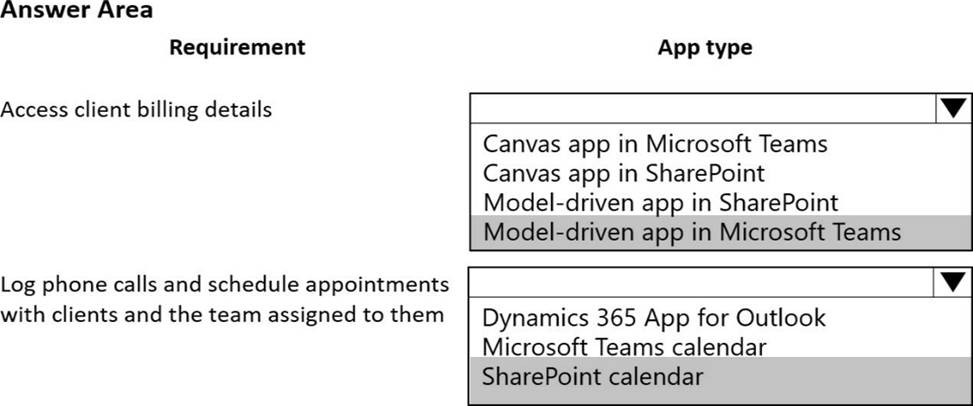
Box 1: Model-driven app in Microsoft Teams
A user's ability to see and use apps is controlled by sharing the application with the user. Sharing of canvas apps is done directly with a user or Azure AD group but is still subject to Dataverse security roles. Sharing of model-driven apps is done via Dataverse security roles.
Box 2: Sharepoint Calendar
Question 77Written Answer
DRAG DROP
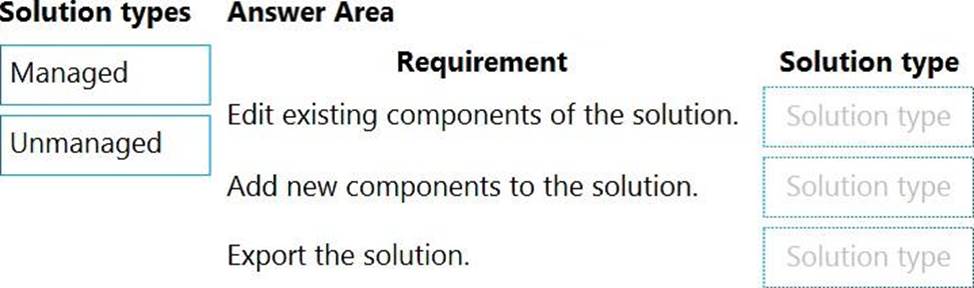
You create multiple apps as part of an unmanaged solution.
You need to move the apps to another environment.
You need to pick the appropriate solution type for each requirement.
Which types of solutions should you create? To answer, drag the appropriate solution types to the correct requirements. Each solution type may be used once, more than once, or not at all. You may need to drag the split bar between panes or scroll to view content. NOTE: Each correct selection is worth one point.
Answer:
Explanation:
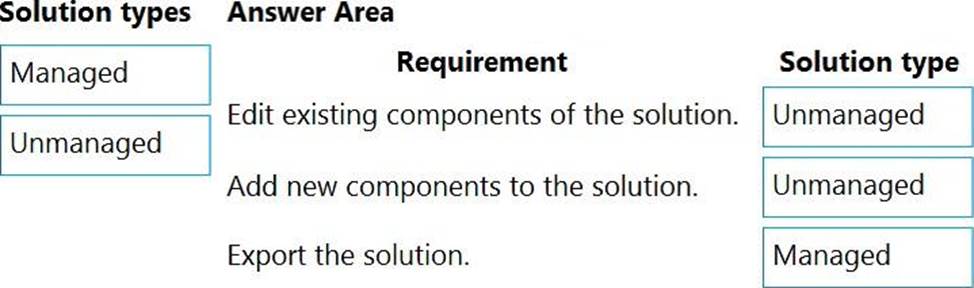
Box 1: Unmanaged
Unmanaged Solution: The beginning state of solution is the unmanaged solution state.
During this phase, you can add, edit, update, remove, delete, and test any of the components of the solution.
Box 2: Unmanaged
Box 3: Managed
Managed Solution: A managed solution is a finalized solution that can be distributed and installed. They are created by exporting an unmanaged solution by setting restrictions to prevent any further customizations. The whole point of Managed is locking down the Component states so they cannot be edited. Deleting the Managed Solution will remove all its customisations as well as data contained. Managed Solutions become read only once deployed so they cannot be manipulated.
Question 78Written Answer
HOTSPOT
A coworker creates a canvas app.
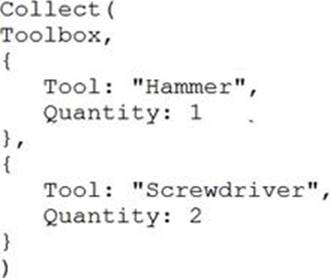
The canvas app contains the following formula.
The formula is attached to the OnVisible property of the first screen that users see:
You are updating the canvas app.
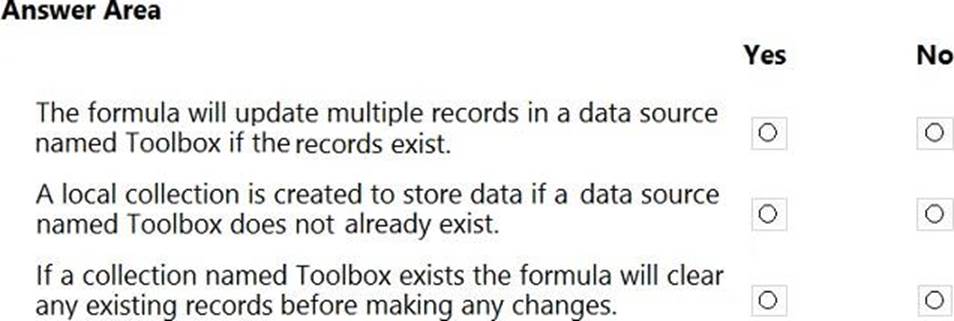
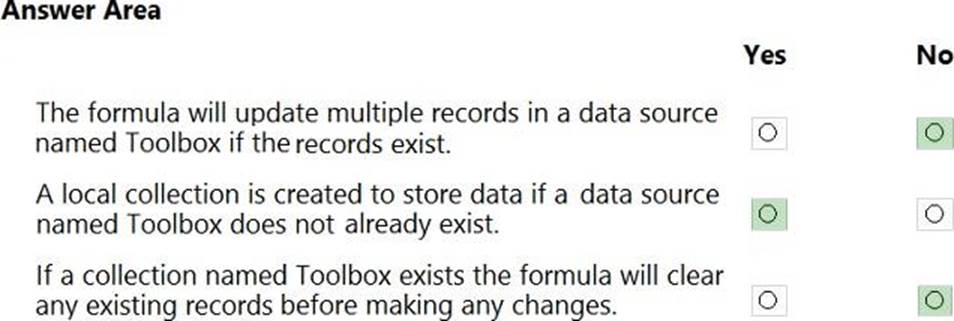
For each of the following statements, select Yes if the statement is true. Otherwise, select No. NOTE: Each correct selection is worth one point.
Answer:
Explanation:
Box 1: No
Records are added, not updated.
Box 2: Yes
The Collect function adds records to a data source.
Syntax: Collect( DataSource, Item, ... )
DataSource C Required. The data source that you want to add data to. If it doesn't already
exist, a new collection is created.
Item(s) - Required. One or more records or tables to add to the data source.
Box 3: No
No records are cleared.
Question 79Written Answer
DRAG DROP
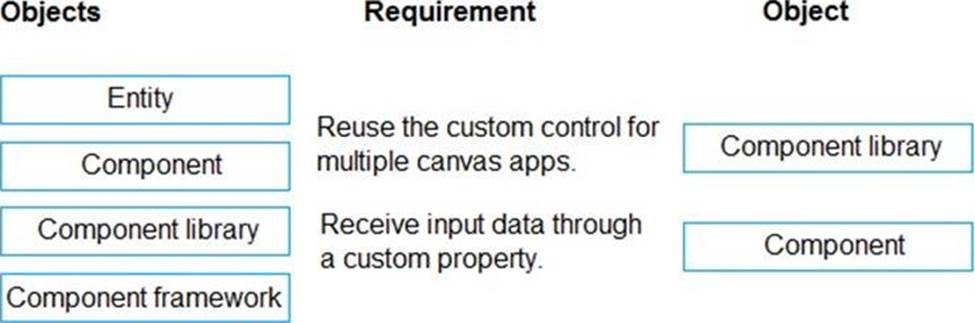
A company is building multiple Power Apps apps to support a mobile sales team.
The apps must all share a common control that has custom properties.
You need to create a solution for the apps.
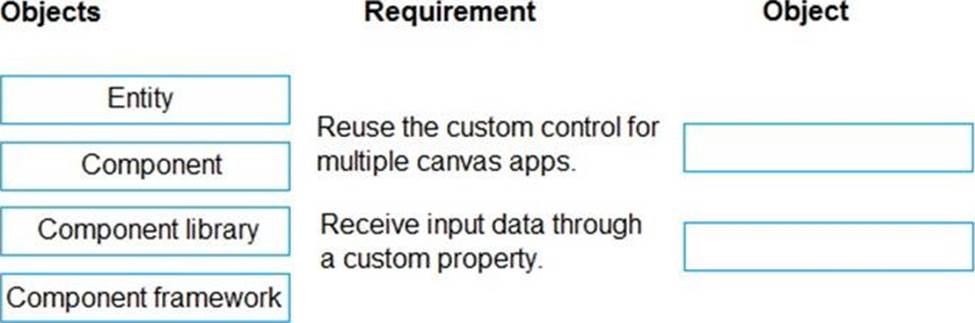
Which objects should you use? To answer, drag the appropriate objects to the correct requirements. Each object may be used once, more than once, or not at all. You may need to drag the split bar between panes or scroll to view content. NOTE: Each correct selection is worth one point.
Answer:
Explanation:
Box 1: Component library
Components are reusable building blocks for canvas apps so that app makers can create custom controls to use inside an app, or across apps using a component library. Components can use advanced features such as custom properties and enable complex capabilities.
By creating a component library, app makers easily share and update one or more components with other makers.
Component libraries are containers of component definitions that make it easy to:
Discover and search components.
Publish updates.
Notify app makers of available component updates.
Box 2: Component
A component can receive input values and emit data if you create one or more custom properties.
Question 80Written Answer
DRAG DROP
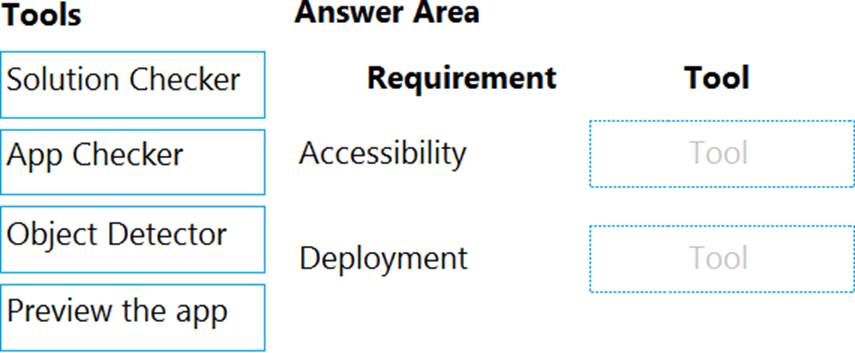
You need to ensure that the app can support the needs of User2 and User3, and meets the production deployment requirements.
Which tools should you use? To answer, select the appropriate tool in the answer area. NOTE: Each correct selection is worth one point.
Answer:
Explanation:
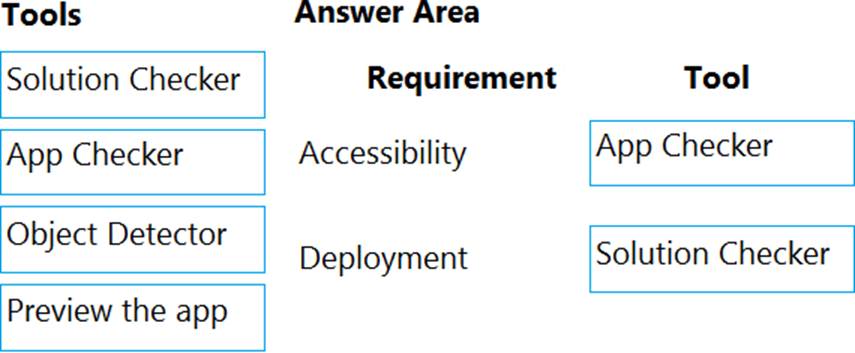
Box 1: App Checker
Scenario: Several sales representatives have accessibility restrictions. User2 is visually impaired and cannot see images. User3 is unable to use a mouse.
Users who have vision, hearing, or other impairments can use your canvas app more easily and successfully if you consider accessibility as you design how the app looks and behaves. If you're not sure how to make your app more accessible, you can run the AppChecker Accessibility checker in Power Apps Studio.
Box 2: Solution Checker
Scenario: Before deploying the app to production, you must ensure that the app conforms to Microsoft accessibility and performance guidelines.
Use solution checker to validate your model-driven apps in Power Apps
Question 81Written Answer
HOTSPOT
Users in your company vote on color choices for marketing materials by using the following canvas app:
Users enter color names into a text control and then select Add color to add the color to the Color options radio control. You must remove all the listed colors when a user selects Clear Selection
You need to implement the functionality.
Which Power Fx formulas should you use? To answer, select the appropriate options in the answer area. NOTE: Each correct selection is worth one point.
Answer:
Question 82Selectable Answer
Note: This question is part of a series of questions that present the same scenario. Each question in the series contains a unique solution that might meet the stated goals. Some question sets might have more than one correct solution, while others might not have a correct solution.
After you answer a question in this section, you will NOT be able to return to it. As a result, these questions will not appear in the review screen.
You are creating a canvas app.
You need to automatically detect bicycles in pictures taken with the camera.
Proposed solution:
✑ Create a Category Classification custom model in AI Builder.
✑ Train the model with pictures of bicycles and then publish the trained model.
✑ Add the Object Detector control to your canvas app.
Does the solution meet the goal?
Answer: Explanation:
Instead create an Object Detection custom model
Reference:
https://docs.microsoft.com/en-us/ai-builder/prediction-overview
https://docs.microsoft.com/en-us/ai-builder/object-detector-component-in-powerapps
Question 83Selectable Answer
You need to create a flow for moving data from the Sales Log to the Job Setup entity.
Which type of flow should you use?
Answer: Explanation:
Scenario: Automatically perform the following actions immediately when a sale is won:
✑ Generate a sequential job number.
✑ Copy key sales information to the Job Setup entity used by manufacturing.
Question 84Written Answer
HOTSPOT
A company uses several forms for biannual performance evaluations. The company conducts the evaluations by using a pen and paper process. The evaluations contain several performance areas that have a score of 1-10. A paragraph explains the score.
The company must scan completed performance evaluations into a Common Data Service entity by using a Power Apps app. The information in the documents must automatically map to entities and convert into quantifiable information.
If any key phrases in the scored topics cause concern, the company must follow a series of actions to prepare for a follow up.
You need to extract the information and perform the actions when the evaluations are scanned.
Which component should you use? To answer, select the appropriate options in the answer area. NOTE: Each correct selection is worth one point.
Answer:
Explanation:
Graphical user interface, text, application, table, email
Description automatically generated
Box 1: AI Builder
The object detection component of AI Builder for PowerApps takes a photo or loads an image file to do an object detection scan. On a mobile device, the user chooses between taking a photo or selecting one already available in the device user interface. When an image is selected, the component automatically scans it to identify objects.
Box 2: Extract entities and their types from text
The Entity extraction prebuilt model identifies and classifies key elements from text into pre-defined entities. You can use the prebuilt model out of the box in power apps and power automate.
Box 3: Scope
Scope is a simple way to put similar actions and conditions together like a Stage.
Question 85Written Answer
HOTSPOT
You need to create a flow for sending required emails to the regional manager.
How should you create the flow? To answer, select the appropriate options in the answer area. NOTE: Each correct selection is worth one point.
Answer:
Explanation:
Graphical user interface, text, application, email
Description automatically generated
Box 1: Business Process
Scenario: If a sales representative submits a status report and assigns the At Risk status to a process, the app must prompt the sales representative to enter a detailed description for the risk. This information must be emailed to the regional manager.
Business process flows provide a guide for people to get work done. They provide a streamlined user experience that leads people through the processes their organization has defined for interactions that need to be advanced to a conclusion of some kind. This user experience can be tailored so that people with different security roles can have an
experience that best suits the work they do.
Box 2: Common Data Service when a record is created
The Microsoft Dataverse (Common Data Service) connector provides the following triggers to help you define when your flows start:
✑ When a row is created, updated, or deleted
✑ When an action is performed
✑ When a flow step is run from a business process flow
Question 86Selectable Answer
Topic 3, Misc. Questions
A company is using Power Virtual Agents in Microsoft Teams to expose Microsoft Dataverse data to employees.
You create a chatbot that retrieves a list of customers by postal code from a Dataverse table. The chatbot will accept requests from a user and must connect to Dataverse to retrieve the data.
You need to connect the chatbot to the Dataverse table.
What should you use?
Answer: Explanation:
Dataverse for Teams is the “lite” version of Dataverse. It is a low-code platform designed to build relatively simple (but still powerful) apps, using a user-friendly interface and remaining within Microsoft Teams. This new update means that users now have the possibility to create Power Apps apps, Power Automate flows and Power Virtual Agents bots without leaving the Teams platform.
Reference:
https://docs.microsoft.com/en-us/learn/paths/work-power-platform-teams/
https://docs.microsoft.com/en-us/learn/modules/create-chatbot-power-virtual-agents-dataverse-teams/5-call-action-pull-data
Question 87Written Answer
HOTSPOT
A user named Bill Jones creates a canvas app and shares it with other users in his company as shown in SharePowerUsers and ShareJimSmith exhibits. (Click the SharePowerUsers tab and the ShareJimSmith tab.)
There are multiple versions of the app. Users must only be able to run the most recently published version of the app as shown in the table below:
You need to ensure that sharing is configured correctly.
For each of the following statements, select Yes if the statement is true. Otherwise, select No. NOTE: Each correct selection is worth one point.
Answer:
Explanation:
A screenshot of a computer
Description automatically generated with low confidence
Box 1: No
They can only use the app.
Box 2: Yes
Box 3: No
You would need to publish Version 2 to make it live.
Note: If you want to publish the restored version, select Publish this version, and then select Publish this version when prompted to confirm.
Graphical user interface, table
Description automatically generated
Notice the published restore version that shows up as Live.
Graphical user interface, application
Description automatically generated
Box 4: Yes
The most recent version of any app is available only to those who have edit permissions for it.
Question 88Written Answer
HOTSPOT
A company is creating an app to manage project status reports.
Users will update a series of controls and dick a submit button. The submit button will calculate a risk score for the project and return to the previous screen with that risk score. The risk score will be used in two different forms.
You need to create the formula on the button click. To answer, select the appropriate option in the answer area NOTE: Each correct selection is worth one point.
Answer:
Question 89Written Answer
HOTSPOT
You are configuring security to enable users to analyze data by using Microsoft Excel templates.
You create a security role named TemplateAdministrator and configure the role as shown below and assign the role to a user named User1.
Use the drop-down menus to select the answer choice that answers each question based on the information presented in the graphic. NOTE: Each correct selection is worth one point.
Answer:
Question 90Written Answer
HOTSPOT
A company is building a Power Apps app to track key project tasks.
Users assign tasks a risk status on a scale of 0 to 100 by using a slider input control named RiskStatus on the app. The highest risks use the risk status value of 100.
For each task, the user selects a button named RiskLevel to send the name of the task and RiskStatus number to key project stakeholders. The color of the button must change to the color listed in the following table based on the value of the RiskStatus control. The default color for the button is green.
You need to configure the solution to change the color of the RiskLevel button.
How should you configure the app? To answer, select the appropriate options in the answer area. NOTE: Each correct selection is worth one point.
Answer:
Explanation:
Text
Description automatically generated
Box 1: On the RiskLevel button.
On the RiskLevel button fill property.
Box 2: Risklevel.Fill = RiskStatus.Value > 75 ? Red: Green;
Most every type of control in a Power App, has a Fill property, for the fill color.