Free Demo Questions

Test Online Free Microsoft MS-102 Exam Questions and Answers

Practice a live sample before buying full access. This page keeps the free MS-102 question set organized by page so visitors and search engines can reach the canonical -questions.html URL directly.

Updated Jan 07, 2026 100 Questions 7 Pages
Page 1 of 7
Next Page
Question 1 Written Answer
DRAG DROP
Your network contains an on-premises Active Directory domain that syncs to Azure Active Directory (Azure AD).
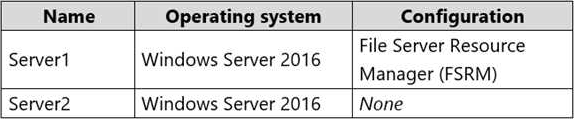
The domain contains the servers shown in the following table.


You use Azure Information Protection.
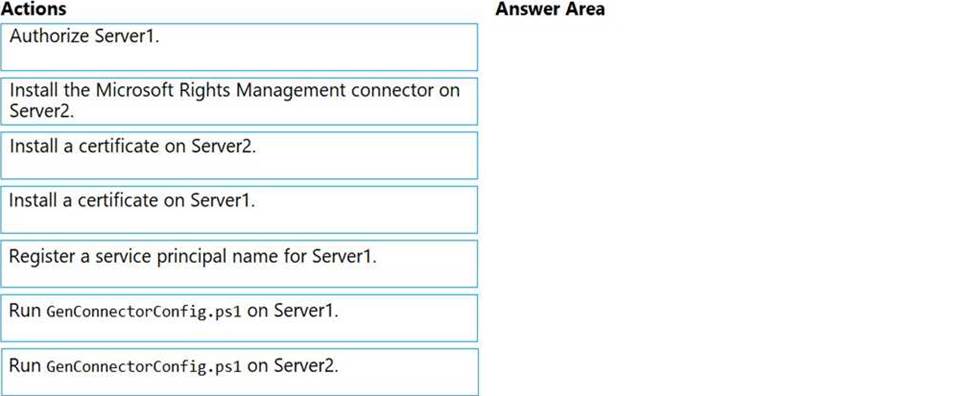
You need to ensure that you can apply Azure Information Protection labels to the file stores on Server1.
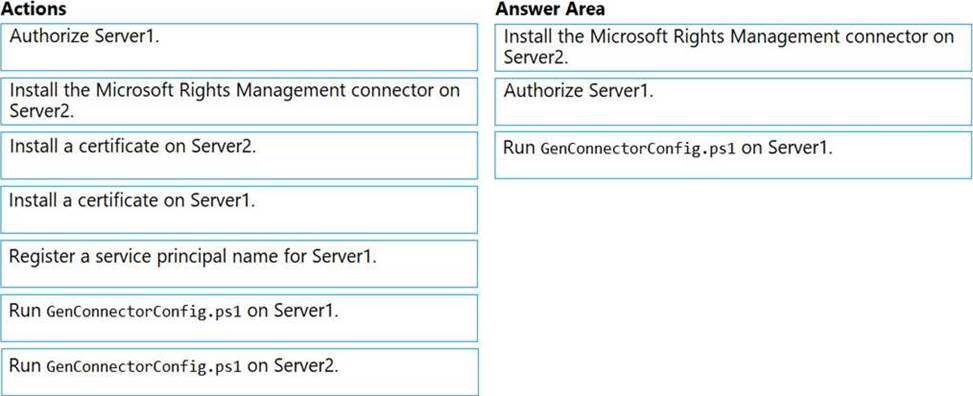
Which three actions should you perform in sequence? To answer, move the appropriate actions from the list of actions to the answer area and arrange them in the correct order.


Answer:


Explanation:
Reference:
https://docs.microsoft.com/en-us/azure/information-protection/install-configure-rms-connector
https://docs.microsoft.com/en-us/azure/information-protection/configure-servers-rms-connector
Question 2 Written Answer
HOTSPOT
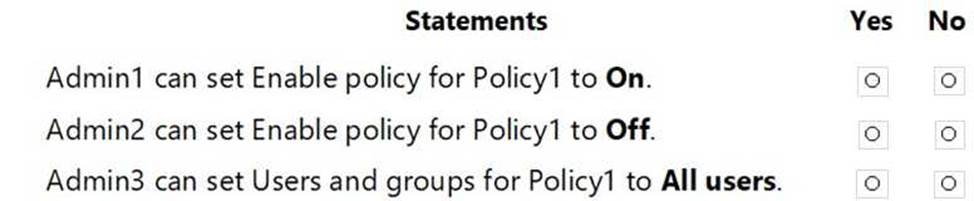
You have a Microsoft 365 E5 subscription linked to an Azure Active Directory (Azure AD) tenant.
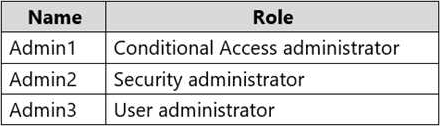
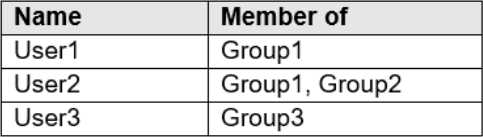
The tenant contains a group named Group1 and the users shown in the following table:


The tenant has a conditional access policy that has the following configurations:
Name: Policy1
Assignments:
- Users and groups: Group1
- Cloud aps or actions: All cloud apps Access controls:
Grant, require multi-factor authentication Enable policy: Report-only
You set Enabled Security defaults to Yes for the tenant.
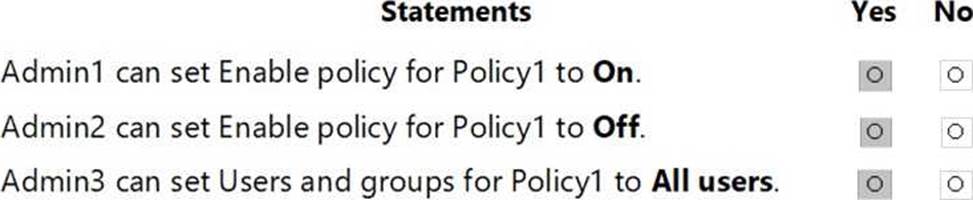
For each of the following settings select Yes, if the statement is true. Otherwise, select No. NOTE: Each correct selection is worth one point.


Answer:


Explanation:
Report-only mode is a new Conditional Access policy state that allows administrators to evaluate the impact of Conditional Access policies before enabling them in their environment.
With the release of report-only mode:
Conditional Access policies can be enabled in report-only mode.
During sign-in, policies in report-only mode are evaluated but not enforced.
Results are logged in the Conditional Access and Report-only tabs of the Sign-in log details.
Customers with an Azure Monitor subscription can monitor the impact of their Conditional Access policies using the Conditional Access insights workbook.
Reference: https://docs.microsoft.com/en-us/azure/active-directory/conditional-access/concept-conditional-access-report-only
Question 3 Written Answer
HOTSPOT
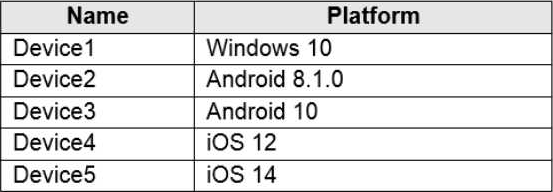
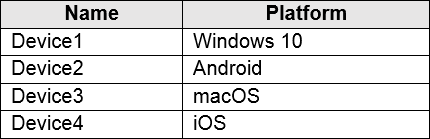
You have a Microsoft 365 E5 tenant that contains five devices enrolled in Microsoft Intune as shown in the following table.


All the devices have an app named App1 installed.
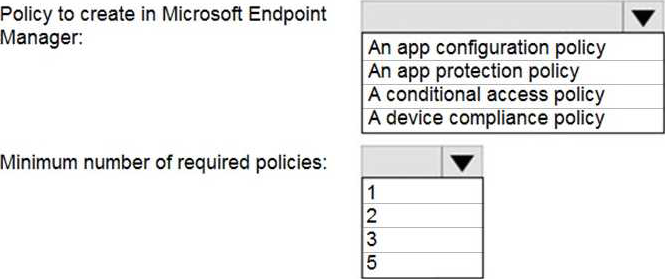
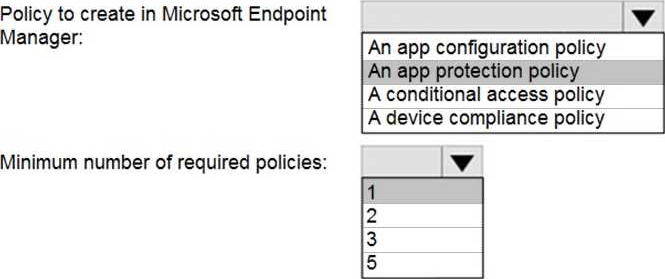
You need to prevent users from copying data from App1 and pasting the data into other apps.
Which policy should you create in Microsoft Endpoint Manager, and what is the minimum number of required policies? To answer, select the appropriate options in the answer area. NOTE: Each correct selection is worth one point.


Answer:


Explanation:
Reference: https://docs.microsoft.com/en-us/mem/intune/apps/app-protection-policy
Question 4 Written Answer
HOTSPOT
You have a Microsoft 365 tenant.
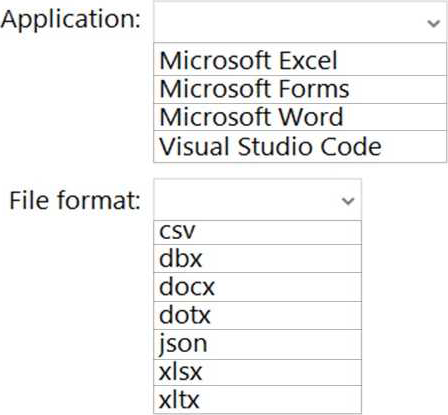
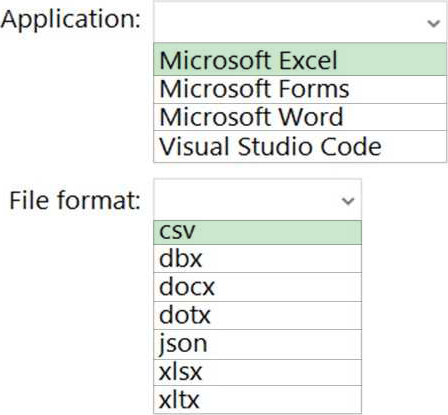
You need to create a custom Compliance Manager assessment template.
Which application should you use to create the template, and in which file format should the template be saved? To answer, select the appropriate options in the answer area. NOTE: Each correct selection is worth one point.


Answer:


Explanation:
Reference: https://docs.microsoft.com/en-us/microsoft-365/compliance/compliance-manager-templates-create?view=o365-worldwide
Question 5 Written Answer
HOTSPOT
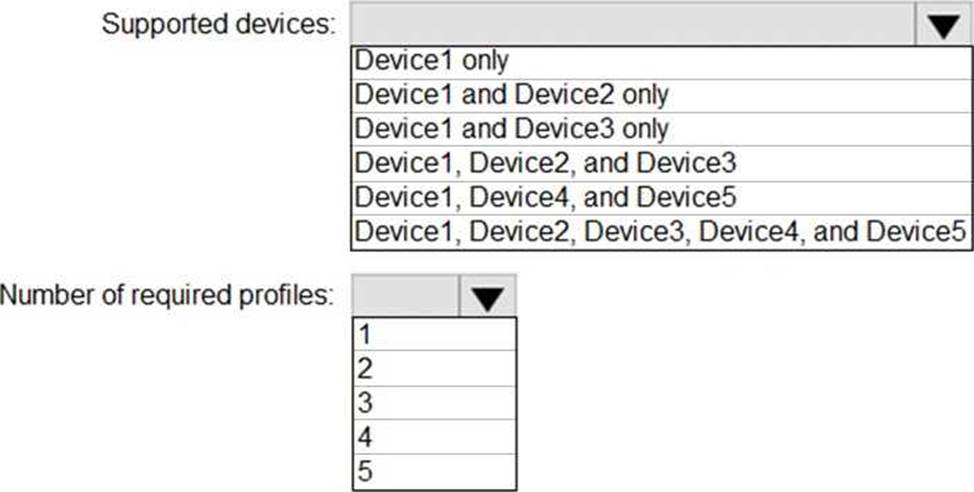
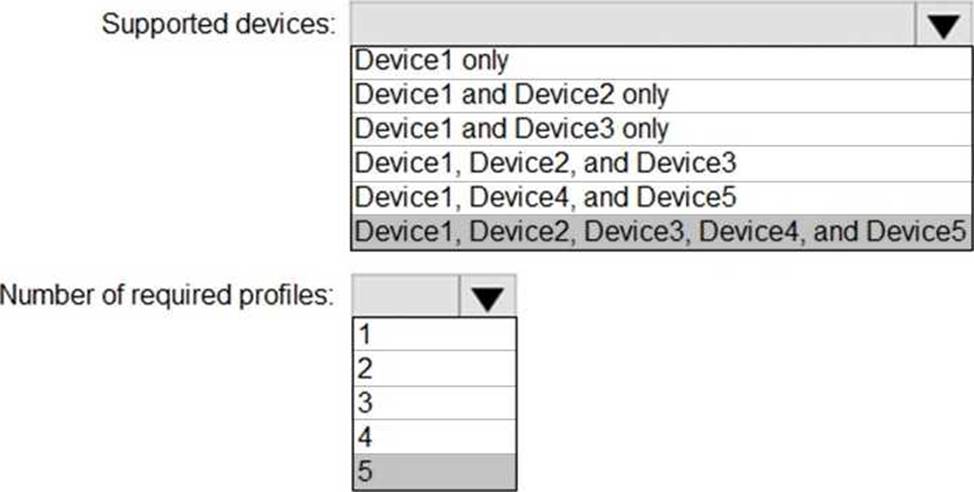
You plan to implement the endpoint protection device configuration profiles to support the planned changes.
You need to identify which devices will be supported, and how many profiles you should implement.
What should you identify? To answer, select the appropriate options in the answer area. NOTE: Each correct selection is worth one point.


Answer:


Explanation:
Reference: https://docs.microsoft.com/en-us/mem/intune/configuration/device-profile-create
Question 6 Selectable Answer
You have a Microsoft 365 subscription that uses Security & Compliance retention policies.
You implement a preservation lock on a retention policy that is assigned to all executive users.
Which two actions can you perform on the retention policy? Each correct answer presents a complete solution. NOTE: Each correct selection is worth one point?

Answer:
Question 7 Selectable Answer
You have a Microsoft 365 E5 tenant that contains four devices enrolled in Microsoft Intune as shown in the following table.


You plan to deploy Microsoft 365 Apps for enterprise by using Microsoft Endpoint Manager.
To which devices can you deploy Microsoft 365 Apps for enterprise?

Answer:
Explanation:
Reference: https://docs.microsoft.com/en-us/mem/intune/apps/apps-add
Question 8 Selectable Answer
You need to create the Safe Attachments policy to meet the technical requirements.
Which option should you select?

Answer:
Explanation:
Reference: https://github.com/MicrosoftDocs/microsoft-365-docs/blob/public/microsoft-365/security/office-365-security/safe-attachments.md
Question 9 Selectable Answer
You need to ensure that User1 can enroll the devices to meet the technical requirements.
What should you do?

Answer:
Explanation:
Reference: https://docs.microsoft.com/en-us/sccm/mdm/deploy-use/enroll-devices-with-device-enrollment-manager
Question 10 Written Answer
HOTSPOT
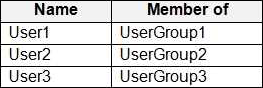
You have a Microsoft 365 E5 tenant that contains the users shown in the following table.


The tenant contains the devices shown in the following table.


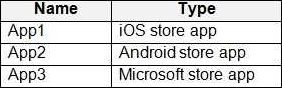
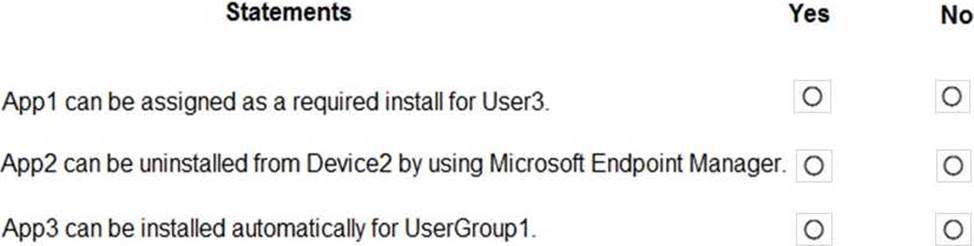
You have the apps shown in the following table.


You plan to use Microsoft Endpoint Manager to manage the apps for the users.
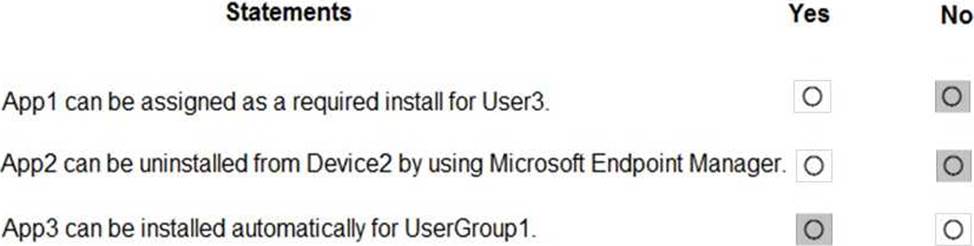
For each of the following statements, select Yes if the statement is true. Otherwise, select No. NOTE: Each correct selection is worth one point.


Answer:


Explanation:
Reference:
https://docs.microsoft.com/en-us/mem/intune/apps/apps-deploy
https://docs.microsoft.com/en-us/mem/intune/apps/apps-windows-10-app-deploy
Question 11 Selectable Answer
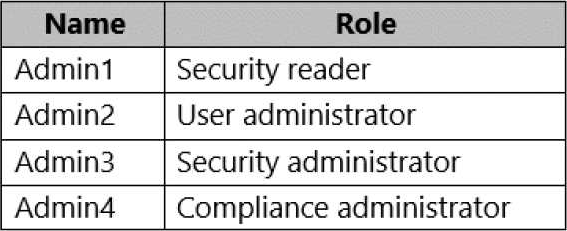
You enable the Azure AD Identity Protection weekly digest email.
You create the users shown in the following table.


Which users will receive the weekly digest email automatically?

Answer:
Explanation:
By default, all Global Admins receive the email. Any newly created Global Admins, Security Readers or
Security Administrators will automatically be added to the recipients list.
Question 12 Written Answer
HOTSPOT
You have a Microsoft 365 subscription that contains the users in the following table.


In Microsoft Endpoint Manager, you create two device type restrictions that have the settings shown in the following table.


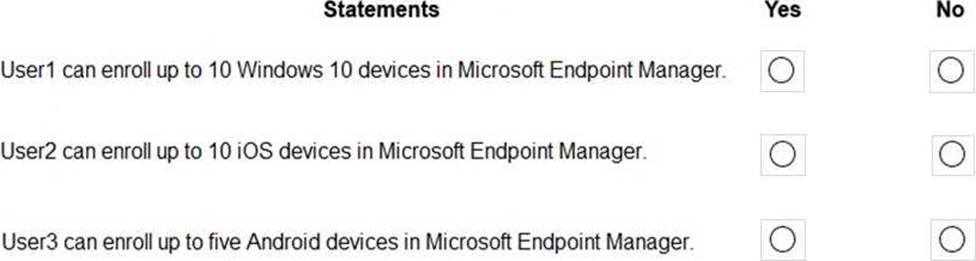
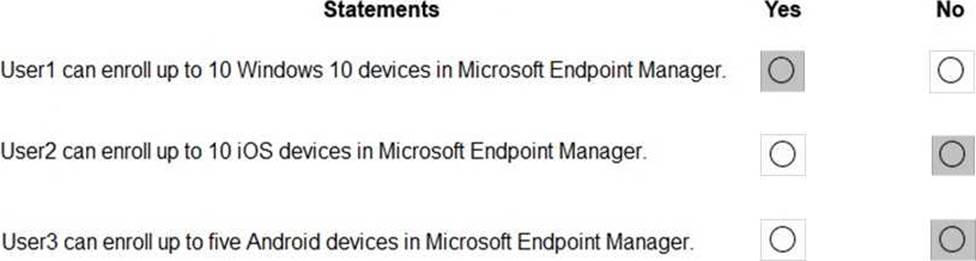
In Microsoft Endpoint Manager, you create three device limit restrictions that have the settings shown in the following table.


For each of the following statements, select Yes if the statement is true. Otherwise, select No. NOTE: Each correct selection is worth one point.


Answer:

Question 13 Written Answer
Topic 3, Litware Inc.

Case Study
This is a case study. Case studies are not timed separately. You can use as much exam time as you would like to complete each case. However, there may be additional case studies and sections on this exam. You must manage your time to ensure that you are able to complete all questions included on this exam in the time provided.

To answer the questions included in a case study, you will need to reference information that is provided in the case study. Case studies might contain exhibits and other resources that provide more information about the scenario that is described in the case study. Each question is independent of the other questions in this case study.

At the end of this case study, a review screen will appear. This screen allows you to review your answers and to make changes before you move to the next section of the exam. After you begin a new section, you cannot return to this section.

To start the case study
To display the first question in this case study, click the Next button. Use the buttons in the left pane to explore the content of the case study before you answer the questions. Clicking these buttons displays information such as business requirements, existing environment, and problem statements. If the case study has an All Information tab, note that the information displayed is identical to the information displayed on the subsequent tabs. When you are ready to answer a question, click the Question button to return to the question.

Overview
General Overviews
Litware, Inc. is a technology research company. The company has a main office in Montreal and a branch office in Seattle.

Environment
Existing Environment
The network contains an on-premises Active Directory domain named litware.com.
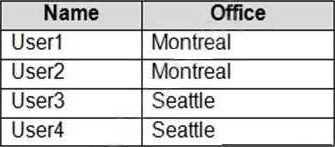
The domain contains the users shown in the following table.


Microsoft Cloud Environment
Litware has a Microsoft 365 subscription that contains a verified domain named litware.com. The subscription syncs to the on-premises domain.

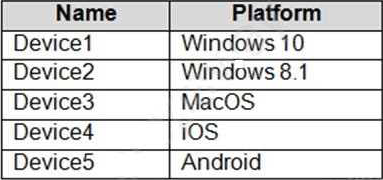
Litware uses Microsoft Intune for device management and has the enrolled devices shown in the following table.


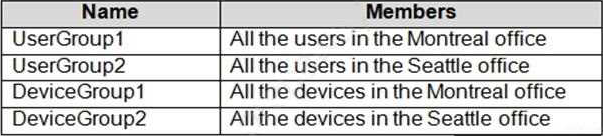
Litware.com contains the security groups shown in the following table.


Litware uses Microsoft SharePoint Online and Microsoft Teams for collaboration.
The verified domain is linked to an Azure Active Directory (Azure AD) tenant named litware.com.
Audit log search is turned on for the litware.com tenant.

Problem Statements
Litware identifies the following issues:
Users open email attachments that contain malicious content.
Devices without an assigned compliance policy show a status of Compliant.
User1 reports that the Sensitivity option in Microsoft Office for the web fails to appear.
Internal product codes and confidential supplier ID numbers are often shared during Microsoft Teams meetings and chat sessions that include guest users and external users.

Requirements
Planned Changes
Litware plans to implement the following changes:
Implement device configuration profiles that will configure the endpoint protection template settings for supported devices.
Configure information governance for Microsoft OneDrive, SharePoint Online, and Microsoft Teams.
Implement data loss prevention (DLP) policies to protect confidential information.
Grant User2 permissions to review the audit logs of he litware.com tenant.
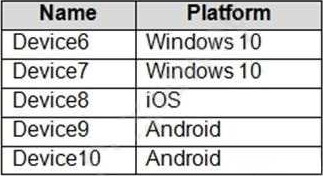
Deploy new devices to the Seattle office as shown in the following table.


Implement a notification system for when DLP policies are triggered.
Configure a Safe Attachments policy for the litware.com tenant.

Technical Requirements
Litware identifies the following technical requirements:
Retention settings must be applied automatically to all the data stored in SharePoint Online sites, OneDrive accounts, and Microsoft Teams channel messages, and the data must be retained for five years.

Emails messages that contain attachments must be delivered immediately, and placeholder must be provided for the attachments until scanning is complete.

All the Windows 10 devices in the Seattle office must be enrolled in Intune automatically when the devices are joined to or registered with Azure AD.

Devices without an assigned compliance policy must show a status of Not Compliant in the Microsoft Endpoint Manager admin center.

A notification must appear in the Microsoft 365 compliance center when a DLP policy is triggered.

User2 must be granted the permissions to review audit logs for the following activities:
- Admin activities in Microsoft Exchange Online
- Admin activities in SharePoint Online
- Admin activities in Azure AD
Users must be able to apply sensitivity labels to documents by using Office for the web.
Windows Autopilot must be used for device provisioning, whenever possible.

A DLP policy must be created to meet the following requirements:
- Confidential information must not be shared in Microsoft Teams chat sessions, meetings, or channel messages.
- Messages that contain internal product codes or supplier ID numbers must be blocked and deleted.
The principle of least privilege must be used.

HOTSPOT
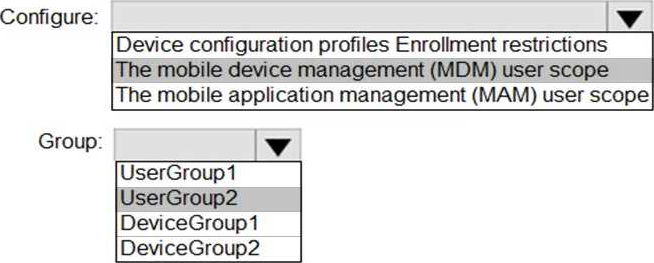
You need to configure automatic enrollment in Intune. The solution must meet the technical requirements.
What should you configure, and to which group should you assign the configurations? To answer, select the appropriate options in the answer area. NOTE: Each correct selection is worth one point.
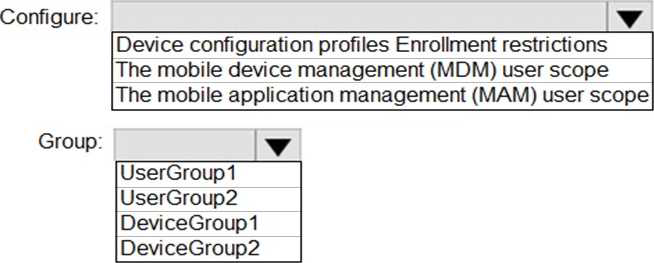


Answer:


Explanation:
Reference: https://docs.microsoft.com/en-us/mem/intune/enrollment/windows-enroll
Question 14 Selectable Answer
You implement Microsoft Azure Advanced Threat Protection (Azure ATP).
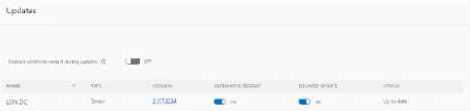
You have an Azure ATP sensor configured as shown in the following exhibit.


How long after the Azure ATP cloud service is updated will the sensor update?

Answer:
Question 15 Selectable Answer
Note: This question is part of a series of questions that present the same scenario. Each question in the series contains a unique solution that might meet the stated goals. Some question sets might have more than one correct solution, while others might not have a correct solution.
After you answer a question in this section, you will NOT be able to return to it. As a result, these questions will not appear in the review screen.
You have a Microsoft 365 E5 subscription.
You create an account for a new security administrator named SecAdmin1.
You need to ensure that SecAdmin1 can manage Office 365 Advanced Threat Protection (ATP) settings and policies for Microsoft Teams, SharePoint, and OneDrive.
Solution: From the Microsoft 365 admin center, you assign SecAdmin1 the SharePoint admin role.
Does this meet the goal?

Answer:
Explanation:
You need to assign the Security Administrator role.
Reference: https://docs.microsoft.com/en-us/microsoft-365/security/office-365-security/office-365-atp?view=o365-worldwide
Showing page 1 of 7
Next Page