Free Demo Questions

Test Online Free Microsoft MB-230 Exam Questions and Answers

Practice a live sample before buying full access. This page keeps the free MB-230 question set organized by page so visitors and search engines can reach the canonical -questions.html URL directly.

Updated Apr 22, 2025 134 Questions 9 Pages
Page 6 of 9
Question 76 Written Answer
You are a Dynamics 365 system administrator.
The customer service desk needs to be able to apply service level agreements (SLAs) on demand to customers that do not have SLAs.
You need to determine how SLAs on demand can be assigned.
What are two possible ways to achieve this goal? Each correct answer presents a complete solution. NOTE: Each correct selection is worth one point.
A. Use an existing customer SLA and change the conditions after assigning the SLA to the customer record.
B. Create a new SLA for each case that does not have a customer SLA.
C. Go into the SLA configuration and assign it to a customer.
D. Automatically apply SLAs to records based on business logic.
E. Assign SLAs manually to records.

Answer: D,E
Explanation:
Apply SLAs on demand.
With the enhancements made to SLAs, you can now apply SLAs to records manually. You can also automatically apply SLAs to records based on your business logic by using workflows or custom plug-ins.
Reference: https://docs.microsoft.com/en-us/dynamics365/customer-service/define-service-level-agreements
Question 77 Written Answer
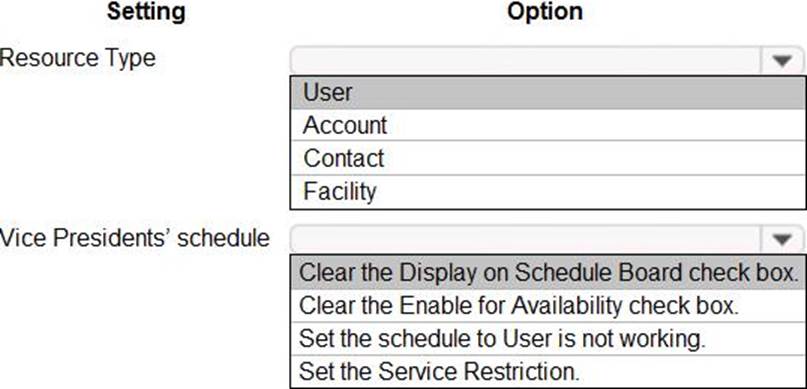
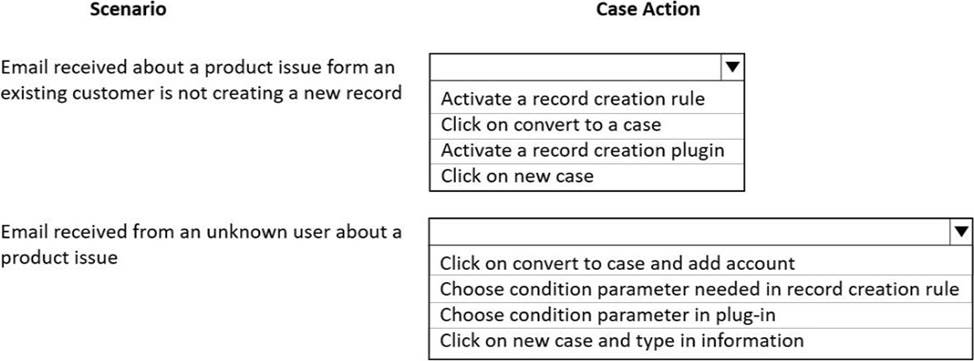
HOTSPOT
You need to configure the correct settings.
Which settings should you configure? To answer, select the appropriate options in the answer area. NOTE: Each correct selection is worth one point.


Answer:


Explanation:
Graphical user interface, text, application, email
Description automatically generated
Question 78 Written Answer
Topic 3, The Phone Company

Case study
This is a case study. Case studies are not timed separately. You can use as much exam time as you would like to complete each case. However, there may be additional case studies and sections on this exam. You must manage your time to ensure that you are able to complete all questions included on this exam in the time provided.

To answer the questions included in a case study, you will need to reference information that is provided in the case study. Case studies might contain exhibits and other resources that provide more information about the scenario that is described in the case study. Each question is independent of the other questions in this case study.

At the end of this case study, a review screen will appear. This screen allows you to review your answers and to make changes before you move to the next section of the exam. After you begin a new section, you cannot return to this section.

To start the case study
To display the first question in this case study, click the Next button. Use the buttons in the left pane to explore the content of the case study before you answer the questions. Clicking these buttons displays information such as business requirements, existing environment, and problem statements. If the case study has an All Information tab, note that the information displayed is identical to the information displayed on the subsequent tabs. When you are ready to answer a question, click the Question button to return to the question.

Overview
The Phone Company provides mobile devices and services to corporate clients. Each client corporation has different agreements and service level agreements (SLAs) in place. Most clients have agreements that last one year and have 30 cases available. Half the cases may be opened by phone. The other half may be opened by email. The company has an existing on-premises software system. The current system no longer meets the company’s needs.
The support desk is open 8:00 am to 8:00 pm Eastern Standard Time.

Requirements
Support desk
The company plans to implement Dynamics 365. The solution will include a custom entity that needs to be search enabled.
You must configure the system to ensure that you can determine how many support tickets and new orders tickets are received. You must be able to determine which device types have the most tickets opened for issues. Business hours in the system must reflect the hours support staff is scheduled.

Case handling
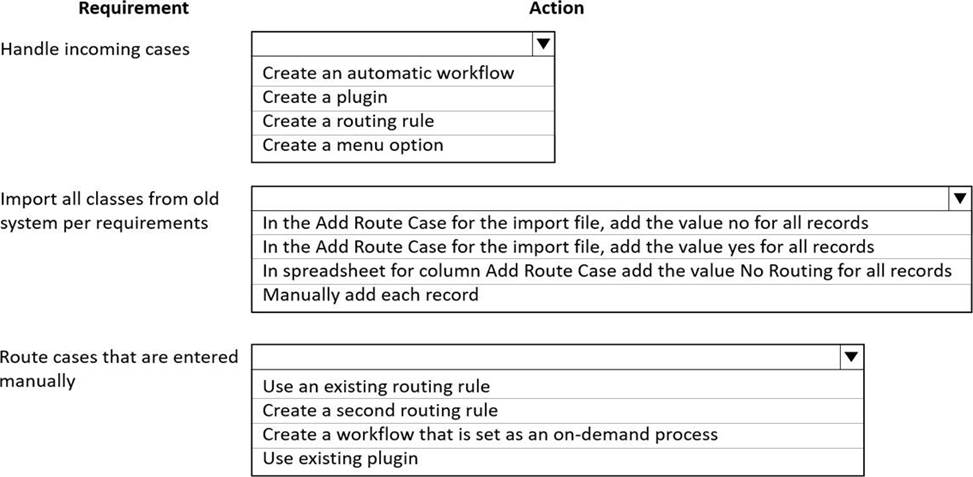
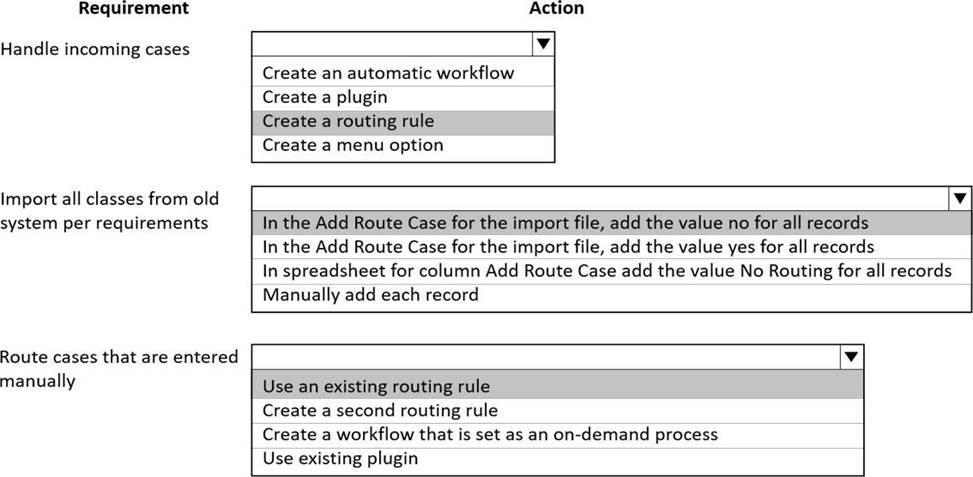
✑ New cases must automatically route to the correct support group by phone type or new purchase group without requiring custom code.
✑ The system must automatically create a case when email is received by companies that are not in the system.
✑ The system must automatically send a response to an email sender upon case creation for new orders, but not for service records.
✑ Users must be able to initiate routing for manually created cases.
✑ The system must create sub-cases from one customer with different cases and also if the same issue is reported by several customers. Subcases must inherit the following fields: customer name, contact email address and case title.
✑ Main cases must not be closed until all the sub-cases are closed.
✑ Separate groups must be created for each type of service and each phone type. Access to the groups must be restricted to team members that support that service or phone type.
✑ When importing from the old system, old cases do not need to be routed to the correct support group.

Knowledge base
✑ Users must be able to search the knowledge base when opening a new case form or when checking on cases.
✑ Users must be able to use relevant searches and include any customer entities.

Dashboards
✑ Managers must be able to see a real-time list of open cases, open activities, and expiring entitlements all on one page.
✑ Managers must also be able to see all open cases, escalated cases and cases by representatives on one screen. Managers must be able to drill down within each area.
✑ Managers need a dashboard that displays weekly statistics for cases and representatives.
✑ Each representative needs to see their own tickets that are opened for the day, week, and month as well as their closed tickets.

Service-level agreements
✑ Most customers must be contacted within 90 minutes of their case being opened.
✑ Some customers can purchase faster service on call backs.
✑ Emails must be sent to support managers when service-level agreements (SLAs) are missed.
✑ Support representatives must be able to see a timer on each case form to ensure they are adhering to their SLAs.
✑ SLA KPIs must be tracked in the system.
✑ SLA KPIs must appear on the case form.
✑ Cases must be able to be placed on hold if issues arise with related contracts.

Issues
Users report they are not able to search the Knowledge Base.

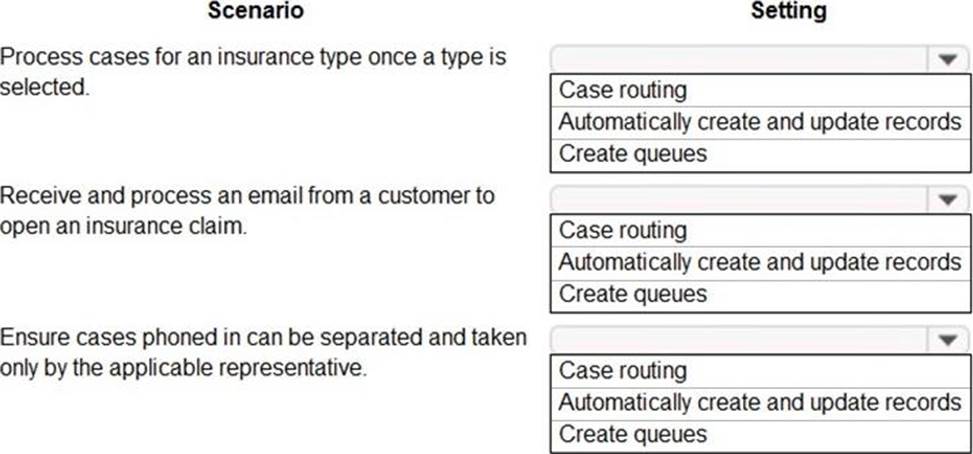
HOTSPOT
You need to meet the automatic case creation requirements.
What should you do? To answer, select the appropriate options in the answer area. NOTE: Each correct selection is worth one point.

Answer:


Explanation:
Graphical user interface, text, application, email
Description automatically generated
Question 79 Written Answer
DRAG DROP
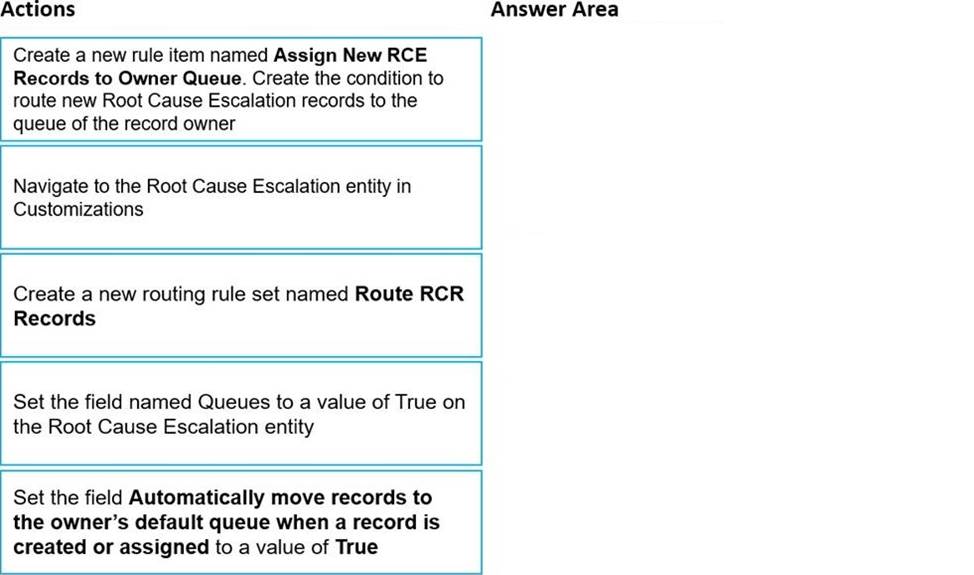
You are a Dynamics 365 Customer Service administrator.
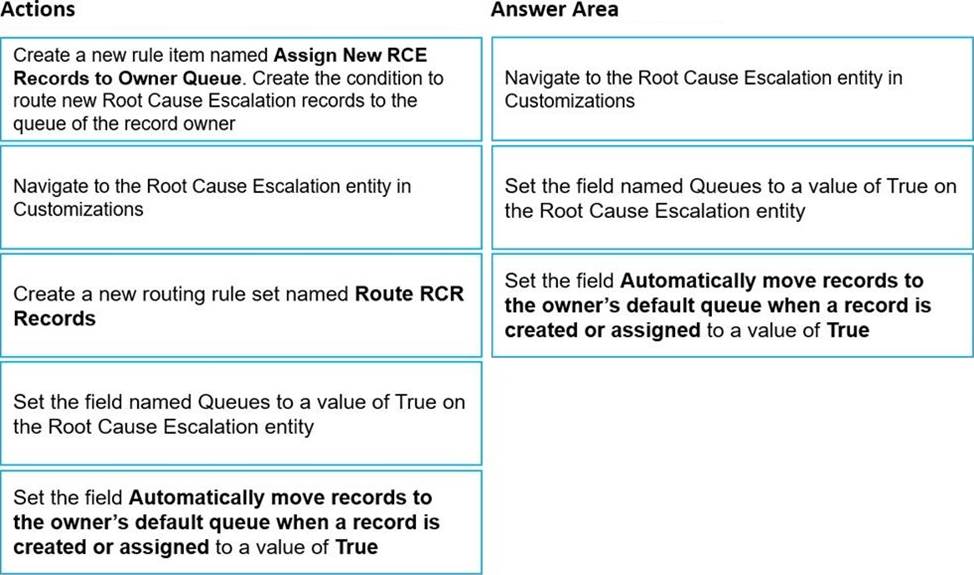
You create a new entity named Root Cause Escalation. Queues must be used for new Root Cause Escalation records. The records must be automatically assigned to the record owner’s default queue when a record is created.
You need to implement the proper functionality to meet the requirements.
Which three actions should you perform in sequence? To answer, move the appropriate actions from the list of actions to the answer area and arrange them in the correct order.


Answer:


Explanation:
A picture containing timeline
Description automatically generated
Question 80 Selectable Answer
Note: This question is part of a series of questions that present the same scenario. Each question in the series contains a unique solution. Determine whether the solution meets the stated goals. Some question sets might have more than one correct solution, while others might not have a correct solution.
After you answer a question in this section, you will NOT be able to return to it. As a result, these questions will not appear in the review screen.
An electrical engineering company is implementing Dynamics 365 Customer Service.
Engineers schedule work in one-hour blocks.
Engineers who complete a job before the end of the one-hour block must not be able to start a new job in that some block.
Engineers who require part of an additional one-hour block to complete a job must not be able to start a new job in that additional block.
You need to configure the fulfillment preference to meet the requirements.
Proposed solution: Create a timegroup with the preference setting of one hour.
Does the solution meet the goal?

Answer:
Explanation:
Time groups enable schedulers to search and view results as blocks of time when using the schedule assistant. Typical examples include mornings, afternoon, nights, and 2-hour windows. Unlike intervals, time groups do not dictate the start time of subsequent bookings. Time groups organize results, but leave the start time/arrival time as-is, based on the particular resource's schedule.
Instead: Proposed solution: Create a fulfillment record and set the interval to one hour.
Note: Fulfillment preferences are customizable entities that let you choose how schedule assistant results are displayed, like with neat hourly appointments or morning and afternoon time windows.
By default, the schedule assistant displays results based entirely on resource schedules and the earliest available time, such as 10:39 AM. With fulfillment preferences set to hourly, the same resource's availability shows as 11:00 AM. This makes it simpler for the scheduler to view and understand availability and communicate it to the customer.
Intervals
Intervals display schedule assistant results in neat time slots that dictate start time of subsequent bookings. When configured as 30-minute intervals, the schedule assistant will display a resource available at 9:27 AM as available at 9:30 AM and will book the start time (arrival time) for 9:30 AM. This includes travel time for onsite requirements and work orders, meaning travel time will begin before 9:30 AM, and a field resource will arrive and start work at 9:30 AM.
Reference: https://docs.microsoft.com/en-us/dynamics365/field-service/set-up-time-groups
Question 81 Selectable Answer
You create a Power Virtual Agents chatbot. The chatbot includes Power Automate flows.
You are not a system administrator.
Users in your organization must collaborate to develop the chatbot.
You attempt to share the chatbot by adding user email addresses and assigning them
Manager, Power Automate User, and Transcript Viewer permissions on the bot. The Send an email invitation to new users option is disabled.
Sharing of the chatbot fails.
You need to use the principle of least privilege to share the chatbot with users for collaboration.
Which two actions should you perform? Each correct answer presents part of a solution. NOTE: Each correct selection is worth one point.

Answer:
Explanation:
B: Insufficient environment permissions
Users in the environment must have the Environment maker security role before a bot can be shared with them.
System administrators of the environment need to assign the Environment maker security role to the user before you share the bot.
C: Share Power Automate flows used in a bot
You can add actions to a bot using flows in Power Automate; however, flows in a bot aren't automatically shared with other users when sharing a bot.
Users who don't have access to the shared flow can still run it by using the test bot canvas.
To let other users edit or add flows you'll need to share them in Power Automate. You can open flows directly from the topic where the flow is used.
Reference:
https://docs.microsoft.com/en-us/power-virtual-agents/admin-share-bots
https://docs.microsoft.com/en-us/dynamics365/customerengagement/on-premises/customize/create-site-map-app
Question 82 Selectable Answer
You need to configure the system so that an email is sent to a manager about the SLAs according to the requirements.
What should you configure?

Answer:
Explanation:
Reference: https://docs.microsoft.com/en-us/dynamics365/customer-service/define-service-level-agreements
Question 83 Selectable Answer
You are configuring a queue in Omnichannel for Customer Service for a call center.
You need to complete the queue configuration using the minimal number of actions.
Which two actions should you perform? Each correct answer presents part of the solution. NOTE: Each correct selection is worth one point.

Answer:
Explanation:
Reference: https://docs.microsoft.com/en-us/dynamics365/customer-service/queues-omnichannel
Question 84 Written Answer
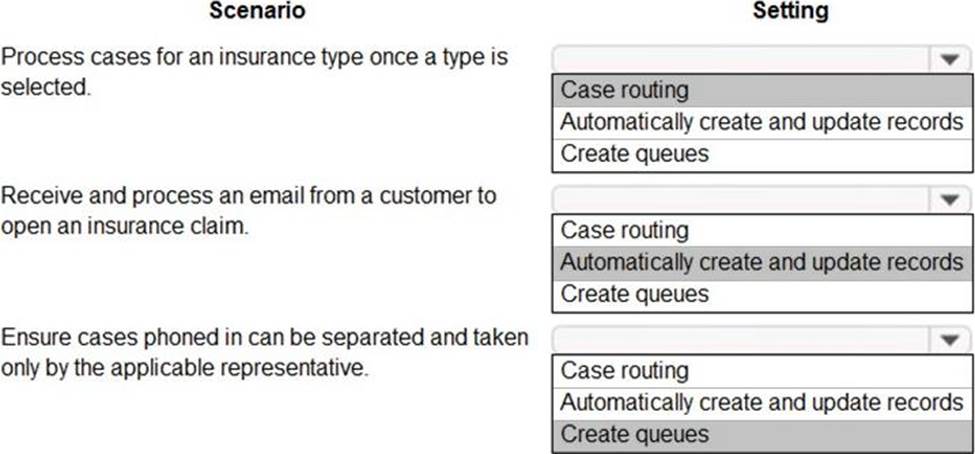
HOTSPOT
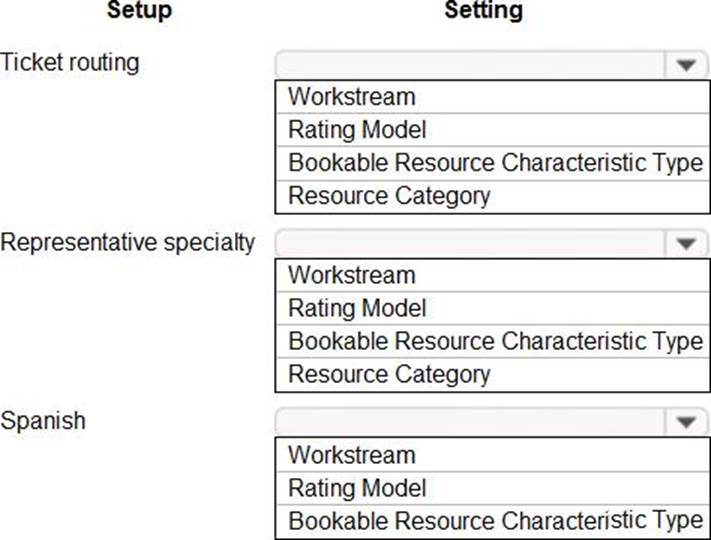
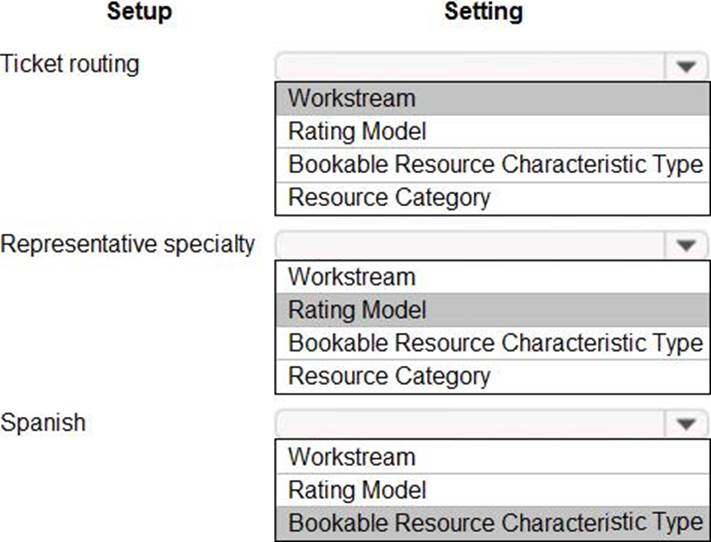
You need to select which setting needs to be configured for each setup.
Which settings should you select? To answer, select the appropriate options in the answer area. NOTE: Each correct selection is worth one point.

Answer:


Explanation:
Graphical user interface, text, application, email
Description automatically generated
Question 85 Written Answer
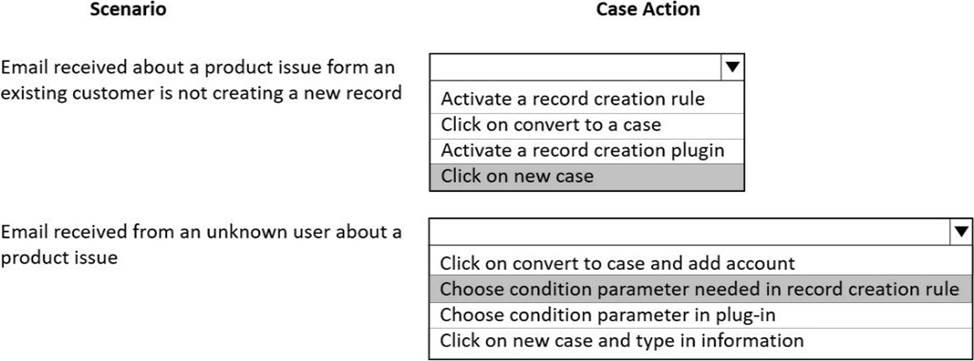
HOTSPOT
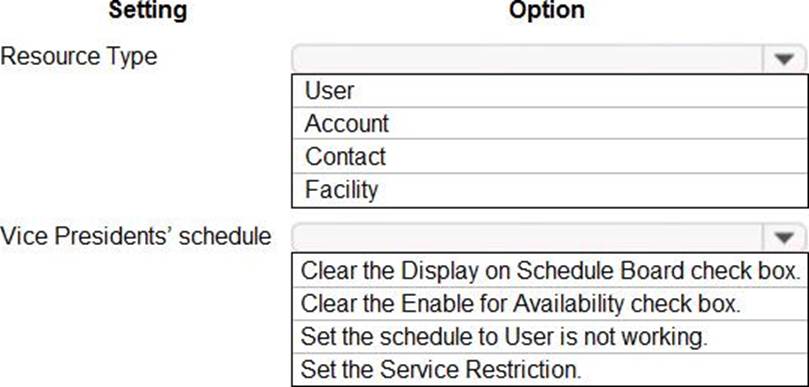
You need to configure the options for the schedule.
Which options should you configure? To answer, select the appropriate options in the answer area. NOTE: Each correct selection is worth one point.

Answer:


Explanation:
Graphical user interface, text, application
Description automatically generated
Question 86 Written Answer
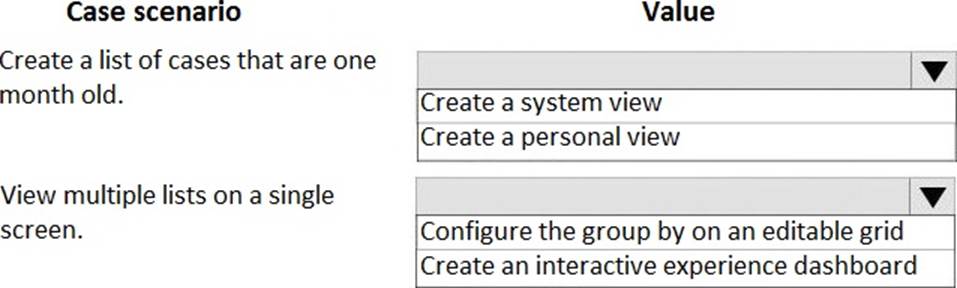
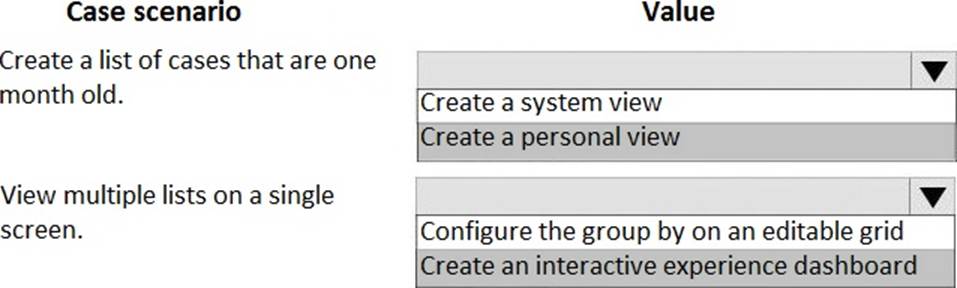
HOTSPOT
You are a customer service representative working with cases in Dynamics 365 for Customer Service.
You need to manage multiple lists of cases.
Which actions should you perform? To answer, select the appropriate configuration in the answer area. NOTE: Each correct selection is worth one point.


Answer:

Question 87 Written Answer
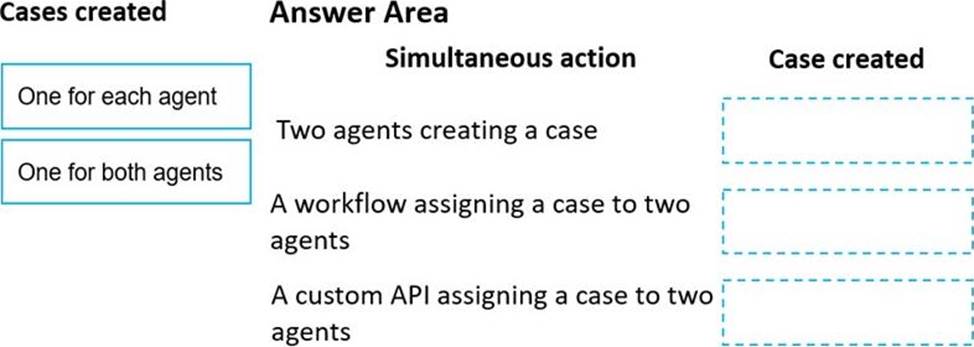
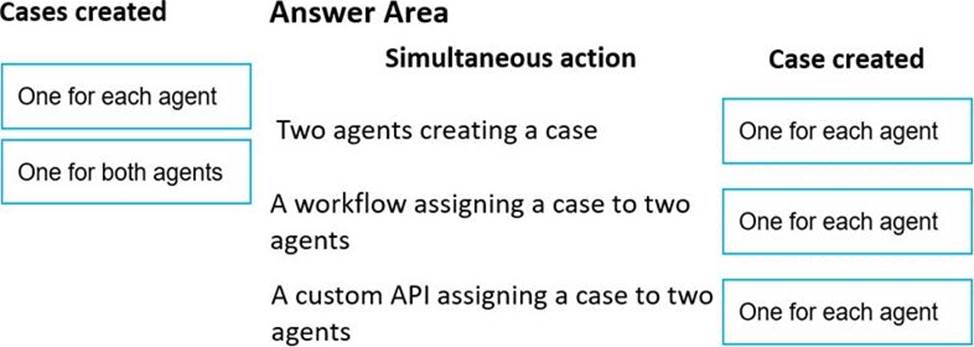
DRAG DROP
A service manager discovers a high number of cases in the agent queues. Cases are created manually but can be reassigned using a workflow or custom API.
The manager needs to know whether cases are getting duplicated because of simultaneous case creation or simultaneous case assignment.
You need to identify the number of cases that are created in each scenario.
How many cases are created? To answer, drag the appropriate cases created options to the correct simultaneous actions. Each cases created option may be used once, more than once, or not at all. You may need to drag the split bar between panes or scroll to view content. NOTE: Each correct selection is worth one point.


Answer:


Explanation:
Graphical user interface, application
Description automatically generated
Question 88 Selectable Answer
You are a Dynamics 365 for Customer Service administrator.
Your company provides standard support contracts for 20 hours of email support. Phone is offered as a premium service in allotments of 10 incidents.
You need to set up an entitlement template for the standard support.
What should you configure?

Answer:
Question 89 Selectable Answer
What should managers use to perform weekly reviews with case representatives?

Answer:
Explanation:
Reference: https://docs.microsoft.com/en-us/dynamics365/customer-service/intraday-agents-insights
Question 90 Written Answer
HOTSPOT
You need to ensure cases are handled correctly.
What should you do? To answer, select the appropriate options in the answer area. NOTE: Each correct selection is worth one point.

Answer:


Explanation:
Graphical user interface, text, application, email
Description automatically generated
Showing page 6 of 9