Free Demo Questions

Test Online Free Microsoft MB-230 Exam Questions and Answers

Practice a live sample before buying full access. This page keeps the free MB-230 question set organized by page so visitors and search engines can reach the canonical -questions.html URL directly.

Updated Apr 22, 2025 134 Questions 9 Pages
Page 3 of 9
Question 31 Written Answer
DRAG DROP
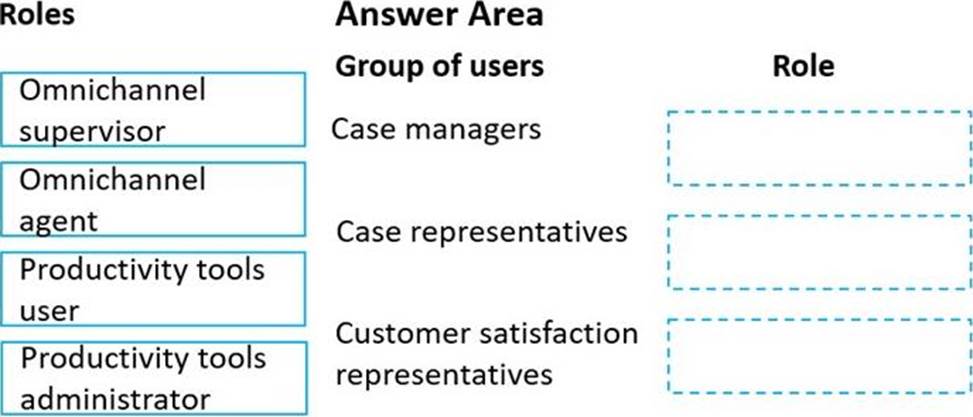
You need to set up users with permissions to use the digital messaging channels.
Which role should you assign to each user? To answer, drag the appropriate roles to the correct groups of users. Each role may be used once, more than once, or not at all. You may need to drag the split bar between panes or scroll to view content.

Answer:

Explanation:
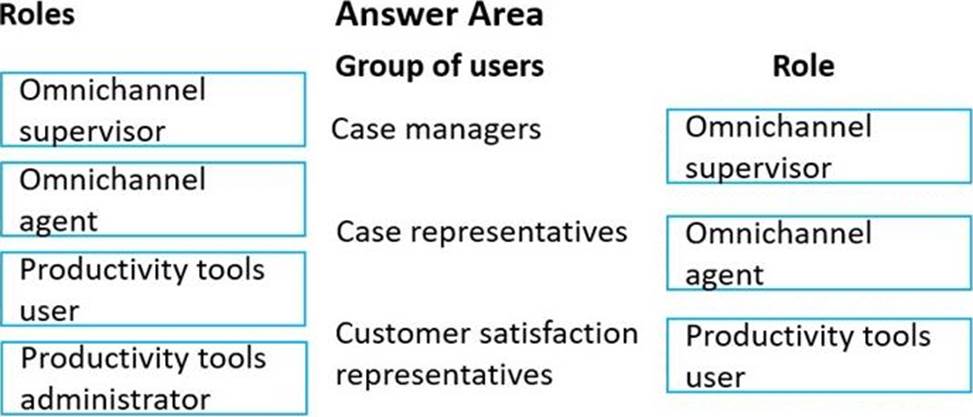
Box 1: Omnichannel supervisor
Case managers schedule shifts and are a point of escalation.
Omnichannel supervisor: Required for performing supervisor tasks.
Businesses need to monitor and manage the efficiency levels of agents in their ongoing conversations with customers. The enhanced supervisor experience provides supervisors with timely insights and metrics on the efficiency of the service delivery of agents and opportunities to help agents deliver better support to customers.
In this enhancement to the supervisor experience in Omnichannel for Customer Service, supervisors can:
Drill down to specific agents and look at their operational metrics.
Manage agent availability remotely.
Box 2: Omnichannel agent
Case representatives handle incoming calls, provide information to patients for appointments, and schedule follow-up calls with doctors. Case representatives can also help with people who want to chat online.
Omnichannel agent: Required for performing agent tasks.
As an Omnichannel agent, you can use queues to manage the work items that are assigned to you via queues. Therefore, you can focus on the tasks at hand and ensure better customer service. The application empowers you to work on simultaneous conversations with multiple customers. You get a holistic view of a customer's data and can see the details of the customer's previous interactions. In this way, you can be sure that you have all the available information that you might need to resolve the customer's issue.
Box 3: Productive tools user
Customer satisfaction representatives monitor all activity and ensure that there is a uniform process for all calls.
Productivity tools user: Required by users of Dynamics 365 Productivity Tools.
Agent productivity tools use intelligence and automation to enable agents to find answers to customer questions and help resolve customer issues quickly, thereby improving satisfaction in service delivery.
Incorrect:
Not Productivity tools administrator:
Productivity tools administrator: Required by administrator users of Dynamics 365 Productivity Tools.
Question 32 Selectable Answer
You need to create the queue for cases.
What type of queue should you create?

Answer:
Explanation:
Reference: https://docs.microsoft.com/en-us/dynamics365/customer-service/set-up-queues-manage-activities-cases
Question 33 Written Answer
Topic 4, Lamna Healthcare Company (NEW)

Case study
This is a case study. Case studies are not timed separately. You can use as much exam time as you would like to complete each case. However, there may be additional case studies and sections on this exam. You must manage your time to ensure that you are able to complete all questions included on this exam in the time provided.

To answer the questions included in a case study, you will need to reference information that is provided in the case study. Case studies might contain exhibits and other resources that provide more information about the scenario that is described in the case study. Each question is independent of the other questions in this case study.

At the end of this case study, a review screen will appear. This screen allows you to review your answers and to make changes before you move to the next section of the exam. After you begin a new section, you cannot return to this section.

To start the case study
To display the first question in this case study, click the Next button. Use the buttons in the left pane to explore the content of the case study before you answer the questions. Clicking these buttons displays information such as business requirements, existing environment, and problem statements. If the case study has an All Information tab, note that the information displayed is identical to the information displayed on the subsequent tabs. When you are ready to answer a question, click the Question button to return to the question.

Background
Lamna Healthcare Company has a call center for the city.
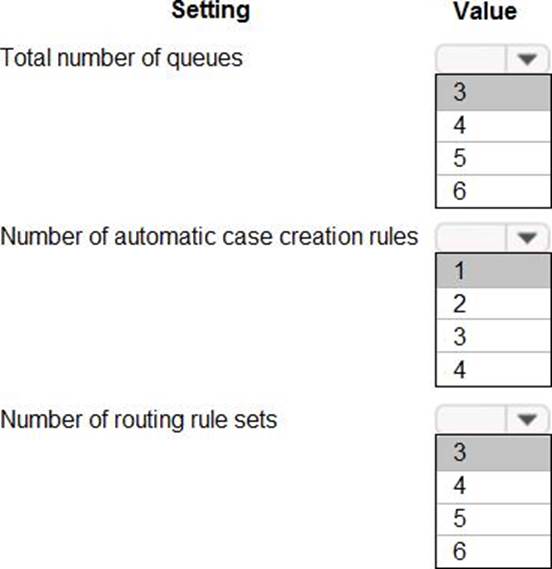
They receive roughly 5,000 calls a day on health issues.
They have the following three departments that take calls daily:
✑ Chronic illnesses
✑ Flu-type illnesses
✑ Geriatric illnesses
There is a fourth area that monitors for miscellaneous issues.
They are implementing Dynamics 365 Customer Service.

Requirements. Queues
✑ A queue has to be set up for each department.
✑ Emails must automatically be routed to the appropriate queue.
✑ Miscellaneous queues must be visible to everyone.
✑ The other queues must be visible only to the appropriate department.
✑ If a case is open more than 30 days, the case must automatically be routed to the supervisor.
✑ There must be a button on the queue list screen to route a case to a supervisor if requested.

Requirements. Visualizations
✑ Support representatives must have a real-time view of cases assigned to them, including the status of each case.
✑ Support representatives must be able to see a graphic view of cases by customer that are assigned to them.

Requirements. Knowledge Base
✑ Support representatives must use the knowledge base first to try to solve issues.
✑ Support representatives must be able to reference the knowledge base when it is used to resolve the case.
✑ The knowledge base article that is used to resolve a case must always be sent to the customer.
✑ If the answer is not in the knowledge base, a support representative needs to create a knowledge base article.

Requirements. Cases
✑ The cases must follow a process that includes identify, research, and resolve.
✑ A confirmation section must be added before the resolve section.
✑ Customers must have contracts that allow them to call Lamna Healthcare 10 times a year for help.
✑ In addition to the 10 free calls, customers must be able to send 15 emails a year for support.
✑ Cases that come in as phone calls must be resolved with seven business days.
✑ Cases that come in as emails must be resolved within three business days.

Requirements. Surveys
✑ Lamna Healthcare sends out about 100,000 surveys a month.
✑ Lamna must use Microsoft Forms Pro for their surveys.
✑ All surveys must have the company logo.
✑ The logo’s company colors must not be changed. Any modifications to the graphic or colors is a breach of company policies.
✑ A survey must automatically be sent once a case is resolved.
✑ A manual survey must be sent if a case is escalated.
✑ A survey must not be sent without confirming that it is accurate.
✑ Supervisors must test a survey before it is finalized.

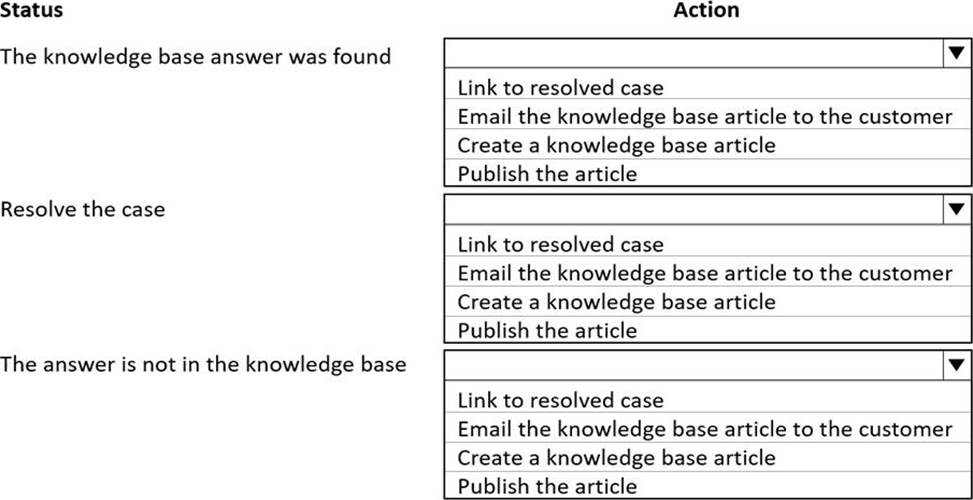
HOTSPOT
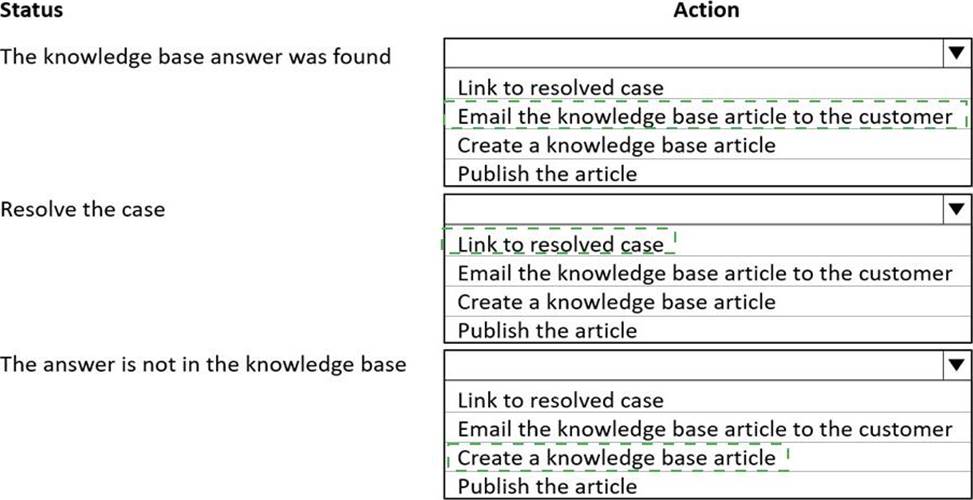
You need to choose the appropriate actions when using the knowledge base.
Which actions should you choose? To answer, select the appropriate options in the answer area. NOTE: Each correct selection is worth one point.


Answer:


Explanation:
Box 1: Email the knowledge base article to the customer
Support representatives must use the knowledge base first to try to solve issues. The knowledge base article that is used to resolve a case must always be sent to the customer.
Box 2: Link to resolved case
Support representatives must be able to reference the knowledge base when it is used to resolve the case.
Box 3: Create a knowledge base article
If the answer is not in the knowledge base, a support representative needs to create a knowledge base article.
Question 34 Selectable Answer
Note: This question is part of a series of questions that present the same scenario. Each question in the series contains a unique solution that might meet the stated goals. Some question sets might have more than one correct solution, while others might not have a correct solution.
After you answer a question in this section, you will NOT be able to return to it. As a result, these questions will not appear in the review screen.
You are a Dynamics 365 for Customer Service system administrator for Contoso, Ltd.
You need to automatically create cases from emails sent to the [email protected] email address.
Solution: Create an automatic record creation and update rule. Set the Source type to Service activity, and then select the queue.
Does the solution meet the goal?

Answer:
Question 35 Written Answer
HOTSPOT
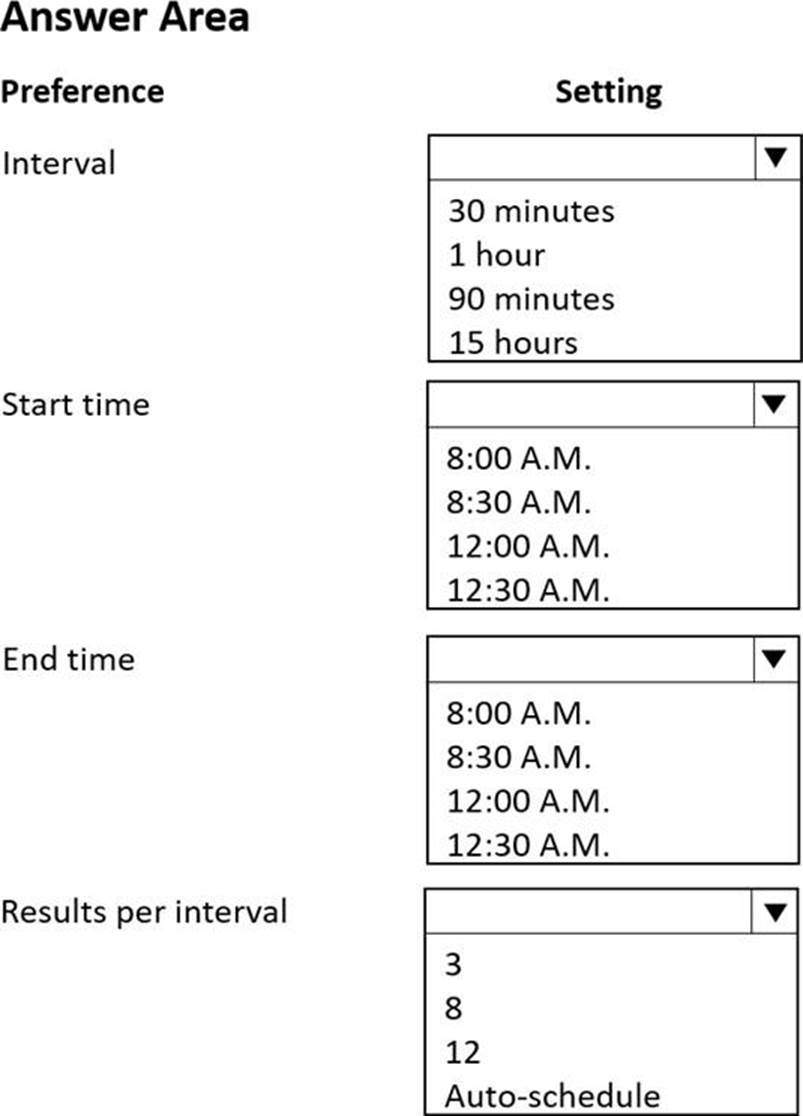
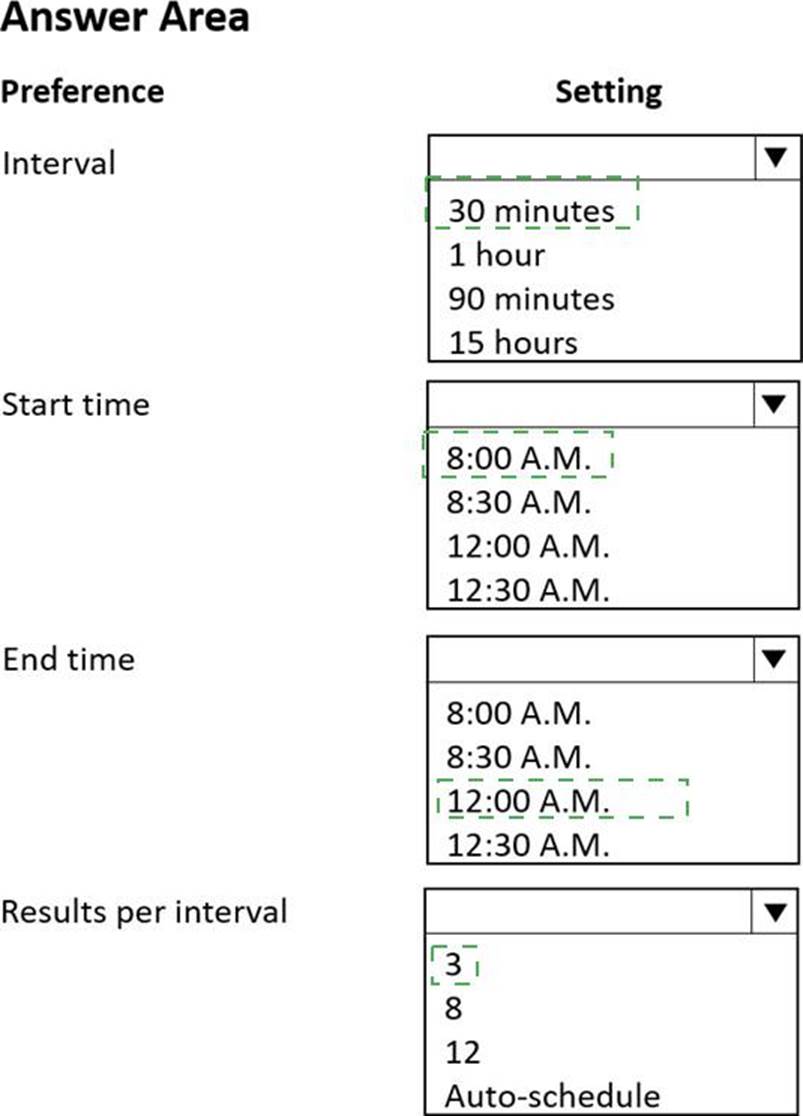
You need to set the schedule to meet requirements for appointments.
How should you configure the settings? To answer, select the appropriate options in the answer area. NOTE: Each correct selection is worth one point.


Answer:


Explanation:
Box 1: 30 minutes
Nurses and doctors must be booked for 30-minute time slots.
Box 2: 8: A.M.
The company is open from 8 AM to midnight Monday through Friday to provide services. Patients can make appointments by calling or using the internet. All appointments are conducted by phone or by using a computer.
Box 3: 12.00 A.M.
Box 4: 3
Patients must be offered at least three alternative times to schedule an appointment.
Question 36 Selectable Answer
Customer service representatives are not able to manually add service-level agreements (SLAs) to a record.
You need to enable on-demand SLAs.
What should you do?

Answer:
Explanation:
References: https://docs.microsoft.com/en-us/dynamics365/customer-engagement/customer-service/define-service-levelagreements
Question 37 Selectable Answer
You set a default entitlement for a customer.
You need to ensure that the default entitlement is automatically associated with a case.
What are two possible ways to achieve this goal? Each correct answer presents a complete solution. NOTE: Each correct selection is worth one point.

Answer:
Explanation:
Reference:
https://docs.microsoft.com/en-us/dynamics365/customer-service/create-entitlement-define-support-termscustomer
https://docs.microsoft.com/en-us/power-platform/admin/system-settings-dialog-box-service-tab
Question 38 Selectable Answer
A company uses Dynamics 365 Customer Service.
Telemetry on agent case resolution time reveals that agents spend 20 minutes on average resolving cases. Analysis determines that resolution duration is increased because agents are often required to view and modify data on the related account.
The company requires a solution that allows agents to enter data in a single screen and edit multiple records without navigating to each record.
You need to create the solution.
Which two actions should you perform? Each correct answer presents part of the solution. NOTE: Each correct selection is worth one point

Answer:
Question 39 Written Answer
DRAG DROP
You manage Dynamics 365 for Customer Service.
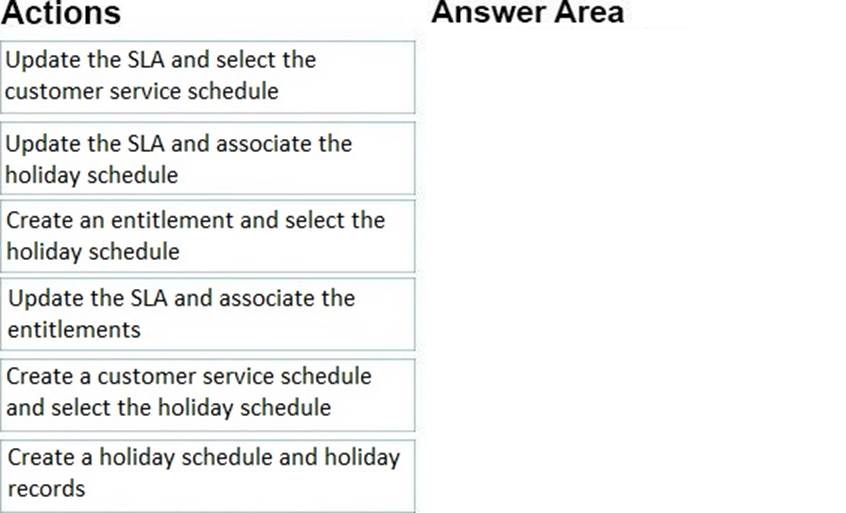
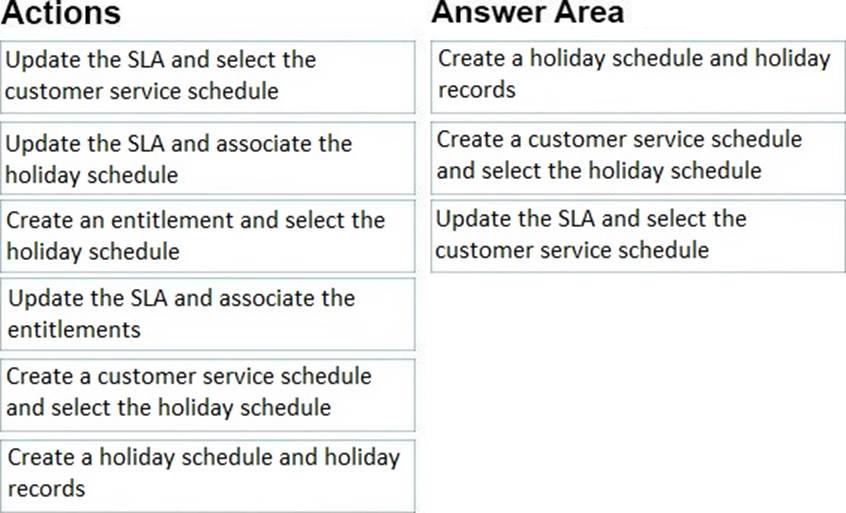
You need to create a list of holidays and ensure that existing service-level agreements (SLAs) observe those holidays.
Which three actions should you perform in sequence? To answer, move the appropriate actions from the list of actions to the answer area and arrange them in the correct order.


Answer:


Explanation:
References: https://docs.microsoft.com/en-us/dynamics365/customer-engagement/customer-service/create-customerservice-schedule-define-work-hours
Question 40 Selectable Answer
You manage Dynamics 365 for Customer Service.
You need to configure automatic case creation for emails received by customers who have a support contract.
What should you do?

Answer:
Question 41 Written Answer
DRAG DROP
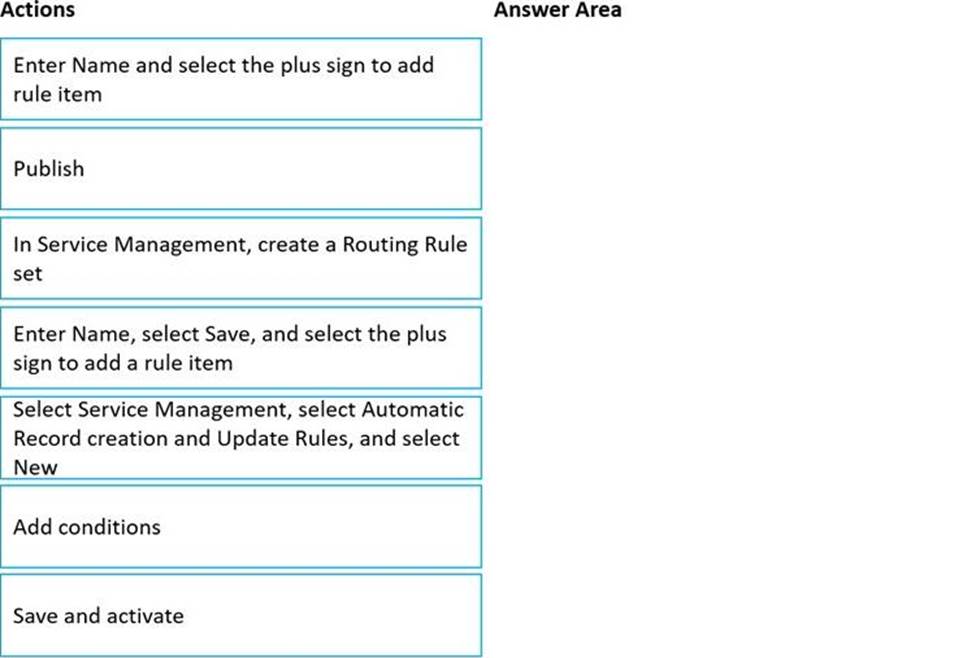
You need to set up the system for cases going to supervisors.
Which four actions should you perform in sequence? To answer, move the appropriate actions from the list of actions to the answer area and arrange them in the correct order.


Answer:


Explanation:
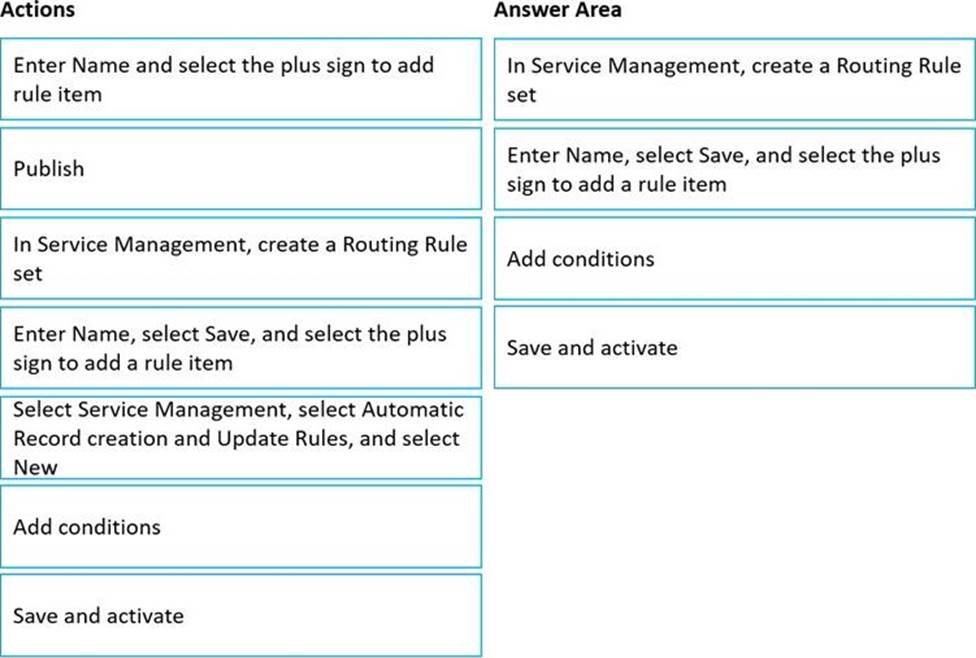
Step 1: In Service Management, create a Routing Rule set.
Scenario: If a case is open more than 30 days, the case must automatically be routed to the supervisor.
Create routing rulesets to route cases.
Use routing rules in Customer Service to route cases to the right agents at the right time without any manual intervention. You can also use routing rules to route cases that are escalated to specific queues.
Step 2: Enter Name, Select Save, and select the plus sign to add a rule item
On the General tab, in Routing Rule Set Information, Enter Name and Description for the routing ruleset.
Select Save. The routing ruleset is saved, and the Rule Items section is displayed. In the Rule Items section, select the Add Rule Item button + to specify conditions for routing cases to a queue.
Step 3: Add conditions
Under Then Conditions, specify the queue to which the cases will be routed or the user or team to which the cases will be assigned if the conditions in the If Conditions section are met.
Step 4: Save and activate.
Select Save and Close.
In the routing ruleset record, select Activate so that the ruleset is applied to the cases matching the conditions in the rule.
Question 42 Selectable Answer
A company is implementing Omnichannel for Dynamics 365 Customer Service.
The company's requirements are:
• Live chat must be available through Omnichannel for cases only.
• High-priority cases must automatically be sent to the next available agent.
• Lower-priority cases must wait to be picked up by an agent
• All work must be distributed evenly with no other conditions.
You need to select the setup that meets the requirements.
Which setup should you select?

Answer:
Question 43 Selectable Answer
You need to configure the system to meet the three-day and seven-day timeframes.
What should you configure?

Answer:
Explanation:
Cases that come in as phone calls must be resolved with seven business days.
Cases that come in as emails must be resolved within three business days.
Note: Service-level agreements (SLAs) enable businesses to track support policies and ensure customers are being supported per the support policy to which they are entitled. Businesses use SLAs to govern support products that customers either receive as part of their purchase or add on to their purchase. SLAs include policy details such as how quickly a customer is entitled to receive support, how many support requests a customer can make, and how long after purchases a customer can be supported as part of the agreement.
Note 2: Create SLAs to define conditions and actions that are applicable when an SLA is applied to an entity.
The following steps are involved in creating the SLA:
✑ Create an SLA.
✑ Create an SLA item.
✑ Configure actions for the SLA item.
✑ Activate the SLA.
Reference: https://docs.microsoft.com/en-us/dynamics365/customer-service/define-service-level-agreements
Question 44 Selectable Answer
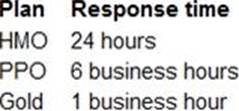
You need to create the SLAs.
Which three SLAs should you create? Each correct answer presents part of the solution. NOTE: Each correct selection is worth one point.

Answer:
Explanation:


Text
Description automatically generated
An email alert must be sent to representatives for SLA violations as follows: HMO 2 hours prior and PPO 1 hour prior.
Question 45 Written Answer
HOTSPOT
You need to create and configure objects to support the requirements.
How should you configure the system? To answer, select the appropriate options in the answer area. NOTE: Each correct selection is worth one point.


Answer:


Explanation:
Graphical user interface, text, application
Description automatically generated
Showing page 3 of 9