Test Online Free HP HPE7-A01 Exam Questions and Answers
Practice a live sample before buying full access. This page keeps the free HPE7-A01 question set organized by page so visitors and search engines can reach the canonical -questions.html URL directly.
The customer needs a network hardware refresh to replace an aging Aruba 5406R core switch pair using spanning tree configuration with Aruba CX 8360-32YC switches.
What is the benefit of VSX clustering with the new solution?
Answer: Explanation:
VSX clustering is a feature that allows two Aruba CX switches to operate as a single logical device, providing high availability, scalability, and simplified management.
VSX clustering has several benefits over spanning tree configuration, such as:
* Dual control plane provides better resiliency. Unlike stacking, where switches share a single control plane, VSX switches have independent control planes that synchronize their states over an inter-switch link (ISL). This means that if one switch fails or reboots, the other switch can continue to operate without affecting traffic flows or network services.
* Active-active forwarding provides better performance. Unlike spanning tree, where some links are blocked to prevent loops, VSX switches use all available links for forwarding traffic, providing load balancing and increased bandwidth utilization.
* Multichassis LAG provides better redundancy. Unlike single-chassis LAG, where all member ports belong to one switch, VSX switches can form multichassis LAGs with downstream or upstream devices, where member ports are distributed across both switches. This provides link redundancy and seamless failover in case of switch or port failure.
References: https://www.arubanetworks.com/assets/tg/TG_VSX.pdf
Question 17Selectable Answer
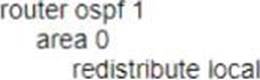
You need lo have different routing-table requirements with Aruba CX 6300 VSF configuration Assuming the correct layer-2 VLAN already exists how would you create a new OSPF configuration for a separate routing table?
Answer: Explanation:
To create a new OSPF configuration for a separate routing table, you need to create a new OSPF process ID with vrf name. This will create a new OSPF instance that is associated with the specified VRF and its routing table. The other options are incorrect because they either do not create a new OSPF instance or do not associate it with a VRF.
References:
https://www.arubanetworks.com/techdocs/AOS-CX/10.04/HTML/5200-6728/bk01-ch02.html
https://www.arubanetworks.com/techdocs/AOS-CX/10.04/HTML/5200-6728/bk01-ch03.html
Question 18Selectable Answer
What is true regarding 802.11k?
Answer: Explanation:
Question 19Selectable Answer
What is an OSPF transit network?
Answer: Explanation:
A. a network that uses tunnels to connect two areas - This is not the standard definition of a transit network in OSPF. While tunnels can be used in OSPF for various purposes (e.g., OSPF virtual links), they are not specifically what defines a transit network.
B. a special network that connects two different areas - While an OSPF network might connect two areas, particularly if it's an Area Border Router (ABR), this doesn't define what a transit network is. Any OSPF-enabled network segment where routers form adjacencies and forward data can be a transit network, irrespective of areas.
D. a network that connects to a different routing protocol - This is describing a boundary where OSPF interfaces with another routing protocol, typically managed using redistribution. This isn't what defines a transit network in OSPF.
Question 20Selectable Answer
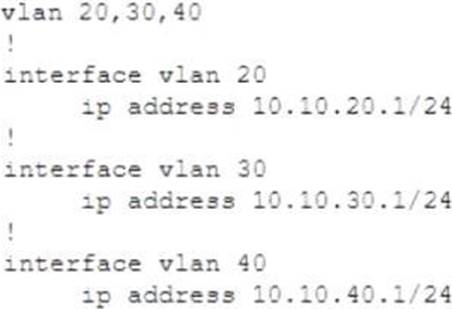
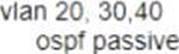
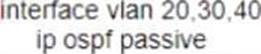
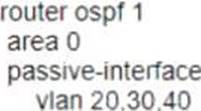
1.Your Aruba CX 6300 VSF stack has OSPF adjacency over SVI 10 with LAG 1 to a neighboring device.
The following configuration was created on the switch:
A)
B)
C)
D)
Answer: Explanation:
The correct configuration for OSPF adjacency over SVI 10 with LAG 1 to a neighboring device is shown in Option C.
The configuration includes the following steps:
* Create a VLAN 10 and assign it a name and an IP address.
* Create a LAG 1 and assign it a name and a mode of dynamic or static.
* Add member ports to LAG 1 and enable the LAG interface.
* Assign VLAN 10 as the untagged VLAN for LAG 1.
* Enable OSPF on the switch and assign it a router ID.
* Create an OSPF area 0 and add SVI 10 as an interface in that area.
Option A is incorrect because it does not enable OSPF on the switch or create an OSPF area. Option B is incorrect because it assigns VLAN 10 as the tagged VLAN for LAG 1, which is not compatible with SVI 10.
Option D is incorrect because it does not add member ports to LAG 1 or enable the LAG interface.
References:
https://techhub.hpe.com/eginfolib/Aruba/OS-CX_10.04/5200-6692/GUID-BD3E0A5F-FE4C-4B9B-BE1D-FE7D
https://techhub.hpe.com/eginfolib/Aruba/OS-CX_10.04/5200-6692/GUID-BD3E0A5F-FE4C-4B9B-BE1D-FE7D
Question 21Selectable Answer
A customer is using stacked Aruba CX 6200 and CX 6300 switches for access and a VSX pair of Aruba CX 8325 as a collapsed core 802 1X is implemented for authentication. Due to the lack of cabling, some unmanaged switches are still in use Sometimes devices behind these switches cause network outages The switch should send a warning to the helpdesk when the problem occurs You have been asked to implement an effective solution to the problem.
What is the solution for this?
Answer: Explanation:
This is the correct solution to the problem of devices behind unmanaged switches causing network outages due to loops. Loop protection is a feature that allows an Aruba CX switch to detect and prevent loops by sending loop protection packets on each port, LAG, or VLAN on which loop protection is enabled. If a loop protection packet is received by the same switch that sent it, it indicates a loop exists and an action is taken based on the configuration. Loop protection should be configured on all edge ports of the Aruba CX 6200 and CX 6300 switches, which are the ports that connect to end devices or unmanaged switches. The trap-option should be set up to send a warning to the helpdesk when a loop is detected. The other options are incorrect because they either do not configure loop protection or do not set up the trap-option.
References:
https://www.arubanetworks.com/techdocs/AOS-CX/10.05/HTML/5200-7540/GUID-99A8B276-0DA3-4458-AF
https://www.arubanetworks.com/techdocs/AOS-CX/10.05/HTML/5200-7540/GUID-D8613BDE-CD21-4B83-85
Question 22Selectable Answer
How is Multicast Transmission Optimization implemented in an HPE Aruba wireless network?
Answer: Explanation:
A. The optimal rate for sending multicast frames is based on the highest broadcast rate across all associated clients - This isn't correct. Basing multicast rate on the highest broadcast rate across all associated clients would mean that only clients with a good signal would benefit. Clients with lower signal quality might struggle or fail to receive these multicast packets.
B. When this option is enabled the minimum default rate for multicast traffic is set to 12 Mbps for 5 GHz - This sounds closer to the approach Aruba might use for Multicast Transmission Optimization, especially on a 5 GHz band. However, we should evaluate all options.
C. The optimal rate for sending multicast frames is based on the lowest broadcast rate across all associated clients - This is not correct. Using the lowest broadcast rate would mean that multicast traffic would be transmitted at the slowest possible rate, which is exactly what we're trying to optimize away from.
D. The optimal rate for sending multicast frames is based on the lowest unicast rate across all associated clients - This isn't the best approach. Using the lowest unicast rate would mean accommodating even the client with the poorest link quality, which can slow down multicast traffic for all other clients.
The best way to optimize multicast in a wireless environment is to increase the rate at which multicast packets are sent so that airtime is used more efficiently. By setting a higher minimum rate (like the 12 Mbps for 5 GHz mentioned in option B), the network ensures that the multicast traffic is sent more quickly and efficiently, but this might mean that only clients with a good enough signal can decode these packets.
Given the options and the understanding of how Aruba networks handle multicast traffic, the most likely answer is:
B. When this option is enabled the minimum default rate for multicast traffic is set to 12 Mbps for 5 GHz.
Question 23Selectable Answer
You need to create a keepalive network between two Aruba CX 8325 switches for VSX configuration How should you establish the keepalive connection?
Answer: Explanation:
To establish a keepalive connection between two Aruba CX 8325 switches for VSX configuration, you need to use a routed port in custom VRF. A routed port is a physical port that acts as a layer 3 interface and does not belong to any VLAN. A custom VRF is a virtual routing and forwarding instance that provides logical separation of routing tables. By using a routed port in custom VRF, you can isolate the keepalive traffic from other traffic and prevent routing loops or conflicts. The other options are incorrect because they either do not use a routed port or do not use a custom VRF.
References:
https://www.arubanetworks.com/techdocs/AOS-CX/10.04/HTML/5200-6728/bk01-ch07.html
https://www.arubanetworks.com/techdocs/AOS-CX/10.04/HTML/5200-6728/bk01-ch02.html
Question 24Selectable Answer
Which method is used to onboard a new UXI in an existing environment with 802 1X authentication? (The sensor has no cellular connection)
Answer: Explanation:
The Aruba installer app is designed for the setup and onboarding of various Aruba devices, including UXI sensors. By scanning the barcode on the UXI sensor, it can be easily added to your environment. This app will guide you through the necessary steps to get the sensor online and working within an 802.1X protected network.
Let's address the other options:
A. Use the UXI app on your smartphone and connect the UXI via Bluetooth - As of the last update, there was no standalone "UXI app" distinct from the Aruba installer app for this purpose.
C. Connect the new UXI from an already installed one and adjust the initial configuration. - This isn't the standard method for onboarding a new UXI sensor. Each UXI sensor has its configuration and should be onboarded individually.
D. Use the CLI via the serial cable and adjust the initial configuration. - While many network devices provide CLI access for deep configurations and troubleshooting, the UXI sensors are designed to be simple and user-friendly, with the primary method of onboarding being through the installer app.
So, the best answer from the given options is:
B. Use the Aruba installer app on your smartphone to scan the barcode.
Question 25Selectable Answer
A new network design is being considered to minimize client latency in a high-density environment. The design needs to do this by eliminating contention overhead by dedicating subcamers to clients.
Which technology is the best match for this use case?
Answer: Explanation:
OFDMA (Orthogonal Frequency Division Multiple Access) is a technology that can minimize client latency in a high-density environment by eliminating contention overhead by dedicating subcarriers to clients. OFDMA allows multiple clients to transmit simultaneously on different subcarriers within the same channel, reducing contention and increasing efficiency. MU-MIMO (Multi-User Multiple Input Multiple Output) is a technology that allows multiple clients to transmit simultaneously on different spatial streams within the same channel, but it does not eliminate contention overhead.
QWMM (Quality of Service Wireless Multimedia) is a technology that prioritizes traffic based on four access categories, but it does not eliminate contention overhead. Channel Bonding is a technology that combines two adjacent channels into one wider channel, increasing bandwidth but not eliminating contention overhead.
References:
https://www.arubanetworks.com/assets/ds/DS_AP510Series.pdf
https://www.arubanetworks.com/assets/wp/WP_WiFi6.pdf