Free Demo Questions

Test Online Free Microsoft AZ-400 Exam Questions and Answers

Practice a live sample before buying full access. This page keeps the free AZ-400 question set organized by page so visitors and search engines can reach the canonical -questions.html URL directly.

Updated Apr 24, 2026 263 Questions 18 Pages
Page 6 of 18
Question 76 Selectable Answer
You have an Azure subscription that contains multiple Azure pipelines.
You need to deploy a monitoring solution for the pi*lines.
The solution must meet the following requirements:
✑ Parse logs from multiple sources.
✑ identify the root cause of issues.
What advanced feature of a monitoring tool should include in the solution?

Answer:
Question 77 Written Answer
DRAG DROP
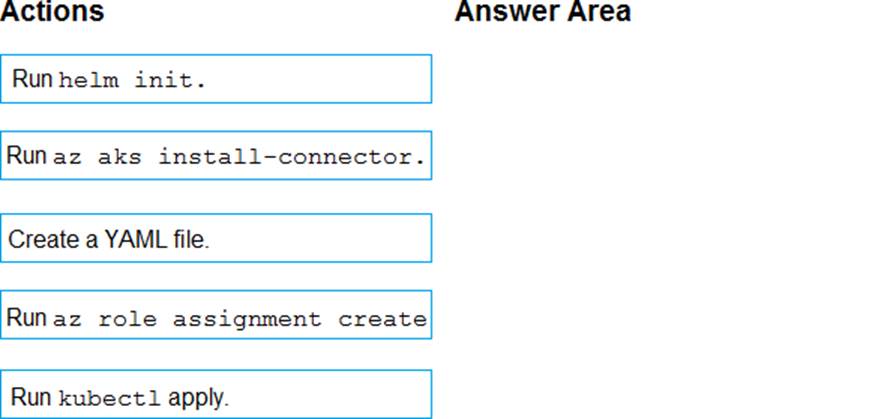
You have an Azure Kubermets Service (AKS) implementation that is RBAC-enabled.
You plan to use Azure Container Instances as a hosted development environment to run containers in the AKS implementation.
You need to conjure Azure Container Instances as a hosted environment for running me containers in AKS.
Which three actions should you perform m sequence? To answer, move the appropriate actions from the list of actions to the answer area and arrange them in the correct order.


Answer:


Explanation:
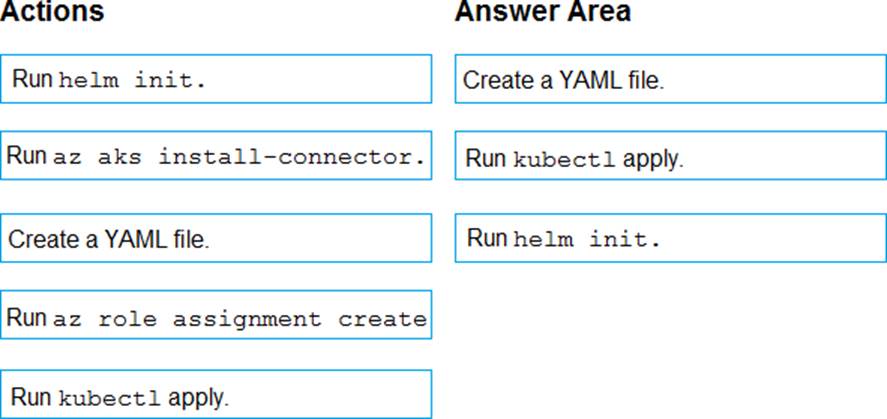
Step 1: Create a YAML file.
If your AKS cluster is RBAC-enabled, you must create a service account and role binding for use with Tiller. To create a service account and role binding, create a file named rbac-virtual-kubelet.yaml
Step 2: Run kubectl apply.
Apply the service account and binding with kubectl apply and specify your rbac-virtual-kubelet.yaml file.
Step 3: Run helm init.
Configure Helm to use the tiller service account:
helm init --service-account tiller
You can now continue to installing the Virtual Kubelet into your AKS cluster.
References: https://docs.microsoft.com/en-us/azure/aks/virtual-kubelet
Question 78 Selectable Answer
You add the virtual machines as managed nodes in Azure Automation State Configuration.
You need to configure the computer in Group7.
What should you do?

Answer:
Explanation:
The Register-AzureRmAutomationDscNode cmdlet registers an Azure virtual machine as an APS Desired State Configuration (DSC) node in an Azure Automation account.
Scenario: The Azure DevOps organization includes:
The Docker extension
A deployment pool named Pool7 that contains 10 Azure virtual machines that run Windows Server 2016


References: https://docs.microsoft.com/en-us/powershell/module/azurerm.automation/register-azurermautomationdscnode
Question 79 Selectable Answer
You are designing an Azure DevOps strategy for your company’s development team.
You suspect that the team’s productivity is low due to accumulate technical debt.
You need to recommend a metric to assess the amount of the team’s technical debt.
What should you recommend?

Answer:
Question 80 Selectable Answer
You need to configure GitHub to use Azure Active Directory (Azure AD) for authentication.
What should you do first?

Answer:
Explanation:
When you connect to a Git repository from your Git client for the first time, the credential manager prompts for credentials. Provide your Microsoft account or Azure AD credentials.
Note: Git Credential Managers simplify authentication with your Azure Repos Git repositories. Credential managers let you use the same credentials that you use for the Azure DevOps Services web portal. Credential managers support multi-factor authentication through Microsoft account or Azure Active Directory (Azure AD). Besides supporting multi-factor authentication with Azure Repos, credential managers also support two-factor authentication with GitHub repositories.
Reference: https://docs.microsoft.com/en-us/azure/devops/repos/git/set-up-credential-managers
Question 81 Selectable Answer
You have a multi-tier application. The front end of the application is hosted in Azure App Service.
You need to identify the average load times of the application pages.
What should you use?

Answer:
Explanation:
Application Insights will tell you about any performance issues and exceptions, and help you find and diagnose the root causes.
Application Insights can monitor both Java and ASP.NET web applications and services, WCF services. They can be hosted on-premises, on virtual machines, or as Microsoft Azure websites.
On the client side, Application Insights can take telemetry from web pages and a wide variety of devices including iOS, Android, and Windows Store apps.
Reference: https://docs.microsoft.com/en-us/azure/azure-monitor/app/web-monitor-performance
Question 82 Selectable Answer
You have a project in Azure DevOps named Project1.
You need to ensure that all new pipelines in Project1 execute three specific tasks during pipeline execution.
What should you create?

Answer:
Explanation:
A task group in Azure DevOps is a collection of tasks that can be reused across multiple pipelines. You can create a task group that contains the three specific tasks that you need to execute during pipeline execution, and then reference that task group in all new pipelines in Project1. This way, you can ensure that the three specific tasks are executed in all new pipelines without having to manually add them to each pipeline.
Question 83 Written Answer
CORRECT TEXT
You have several apps that use an Azure SQL Database named db1.
You need to ensure that queries to db1 are tuned by Azure over time. The solution must only apply to db1.
To complete this task, sign in to the Microsoft Azure portal.

Answer:
Question 84 Written Answer
DRAG DROP
You need to implement Project6.
Which three actions should you perform in sequence? To answer, move the appropriate actions from the list of actions to the answer area and arrange them m the correct order.


Answer:


Explanation:
Scenario: Implement Project3, Project5, Project6, and Project7 based on the planned changes


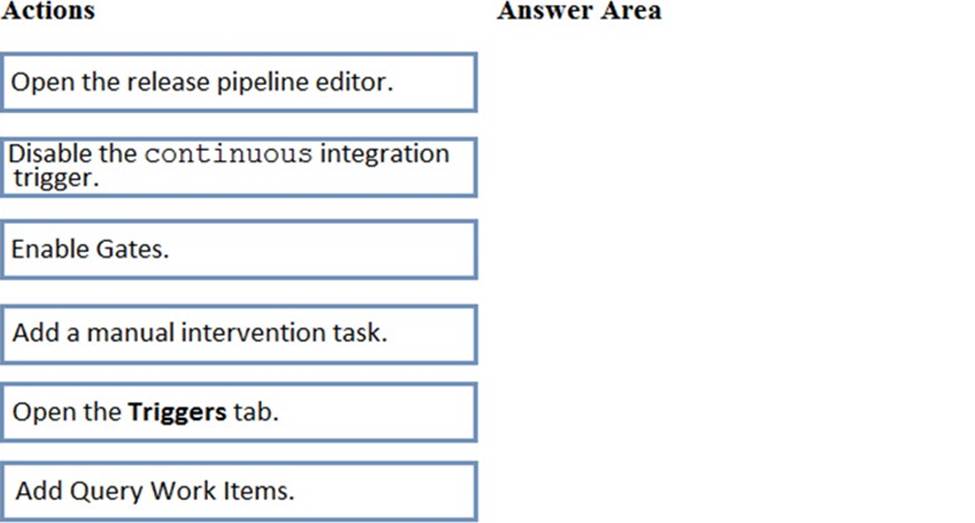
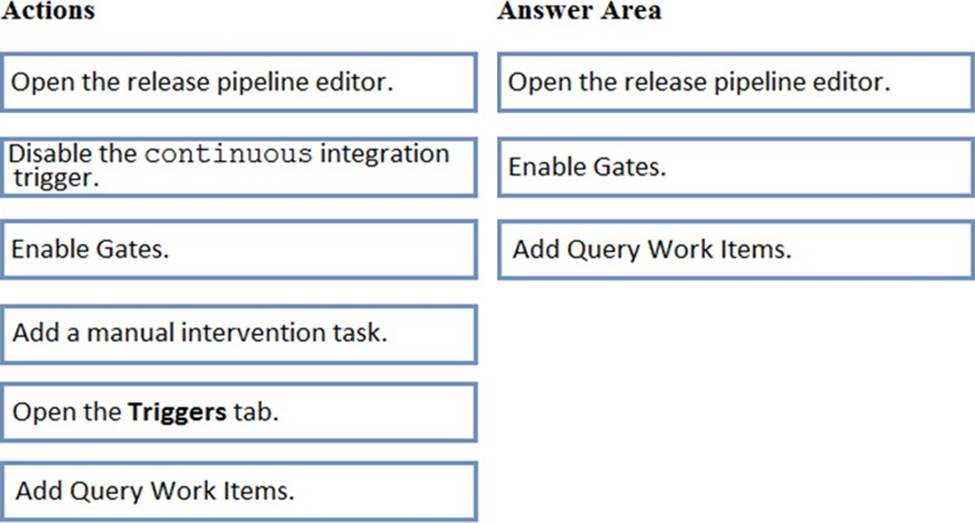
Step 1: Open the release pipeline editor.
In the Releases tab of Azure Pipelines, select your release pipeline and choose Edit to open the pipeline editor.
Step 2: Enable Gates.
Choose the pre-deployment conditions icon for the Production stage to open the conditions panel. Enable gates by using the switch control in the Gates section.
Step 3: Add Query Work items.
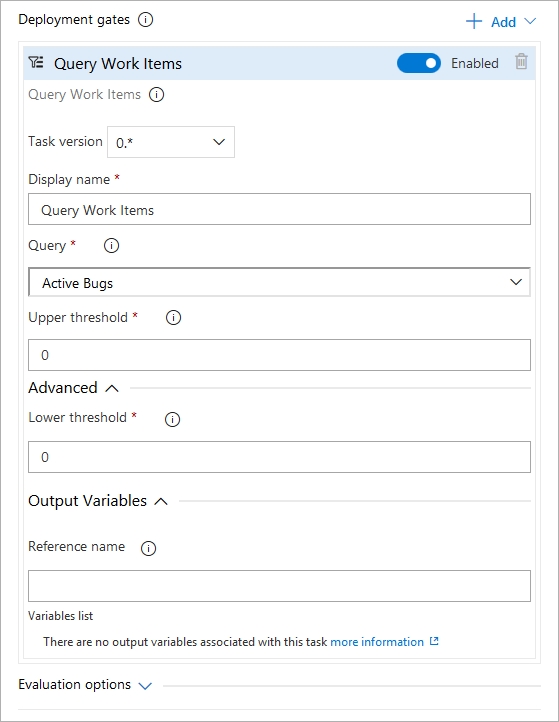
Choose + Add and select the Query Work Items gate.
Configure the gate by selecting an existing work item query.


Note: A case for release gate is:
Incident and issues management. Ensure the required status for work items, incidents, and issues. For example, ensure deployment occurs only if no priority zero bugs exist, and validation that there are no active incidents takes place after deployment.
Reference: https://docs.microsoft.com/en-us/azure/devops/pipelines/release/deploy-using-approvals?view=azure-devops#configure-gate
Question 85 Written Answer
Topic 2, Contoso Case Study: 2

Overview
Existing Environment
Contoso, Ltd. is a manufacturing company that has a main office in Chicago.
Contoso plans to improve its IT development and operations processes by implementing Azure DevOps principles. Contoso has an Azure subscription and creates an Azure DevOps organization.

The Azure DevOps organization includes:
• The Docker extension
• A deployment pool named Pool7 that contains 10 Azure virtual machines that run Windows Server 2016
The Azure subscription contains an Azure Automation account.

Planned Changes
Contoso plans to create projects in Azure DevOps as shown in the following table.
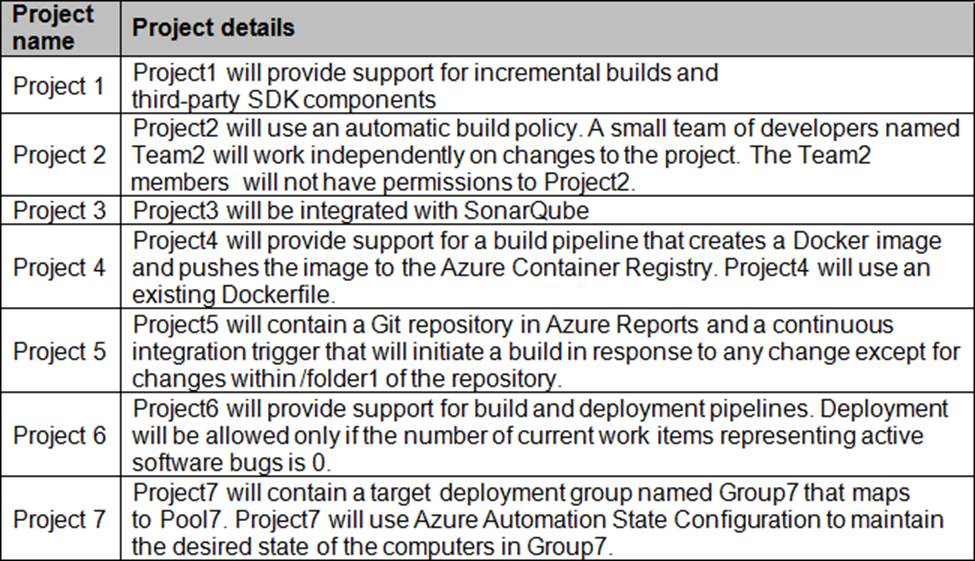


Technical Requirements
Contoso identities the following technical requirements:
• Implement build agents rot Project 1.
• Whenever possible, use Azure resources
• Avoid using deprecated technologies
• Implement a code flow strategy for Project2 that will:
• Enable Team 2 to submit pull requests for Project2.
• Enable Team 2 to work independently on changes to a copy of Project?
• Ensure that any intermediary changes performed by Tram2 on a copy of Project2 will be subject to the same restrictions as the ones defied in the build policy of Project2.
• Whenever possible. Implement automation and minimize administrative effort.
• Implement Protect3, Project5, Project6, and Project7 based on the planned changes.
• Implement Project4 and configure the project to push Docker images to Azure Container Reentry.

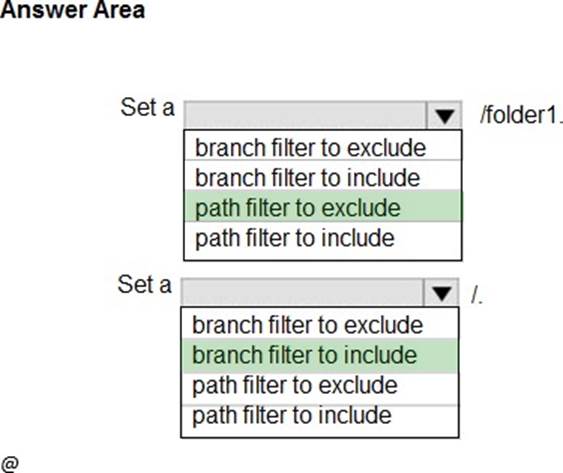
HOTSPOT
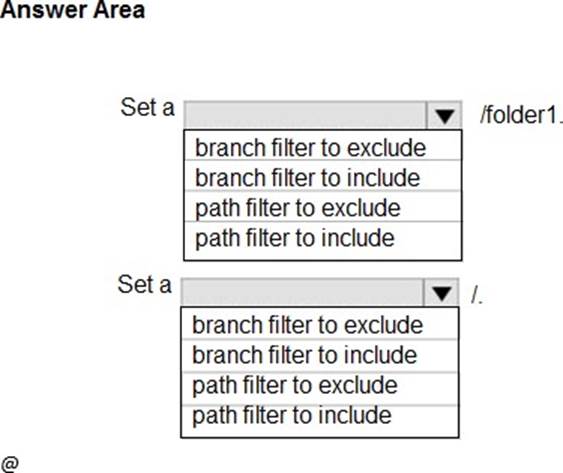
How should you configure the filters for the Project5 trigger? To answer, select the appropriate option in the answer area. NOTE: Each correct selection is worth one point.


Answer:


Explanation:
Scenario:
References: https://docs.microsoft.com/en-us/azure/devops/pipelines/build/triggers
Question 86 Selectable Answer
You have an Azure DevOps project that contains a build pipeline. The build pipeline uses approximately 50 open source libraries.
You need to ensure that all the open source libraries comply with your company’s licensing standards.
Which service should you use?

Answer:
Explanation:
Secure and Manage Open Source Software
Black Duck helps organizations identify and mitigate open source security, license compliance and code-quality risks across application and container portfolios. Black Duck Hub and its plugin for Team Foundation Server (TFS) allows you to automatically find and fix open source security vulnerabilities during the build process, so you can proactively manage risk. The integration allows you to receive alerts and fail builds when any Black Duck Hub policy violations are met.
Note: WhiteSource would also be a good answer, but it is not an option here.
Reference: https://marketplace.visualstudio.com/items?itemName=black-duck-software.hub-tfs
Question 87 Written Answer
HOTSPOT
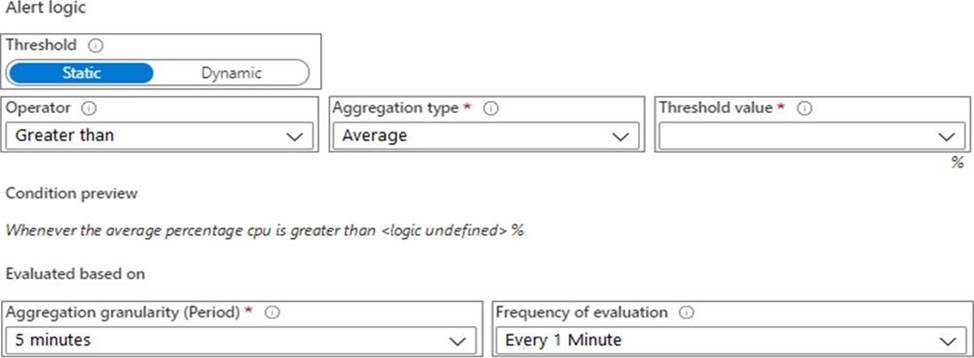
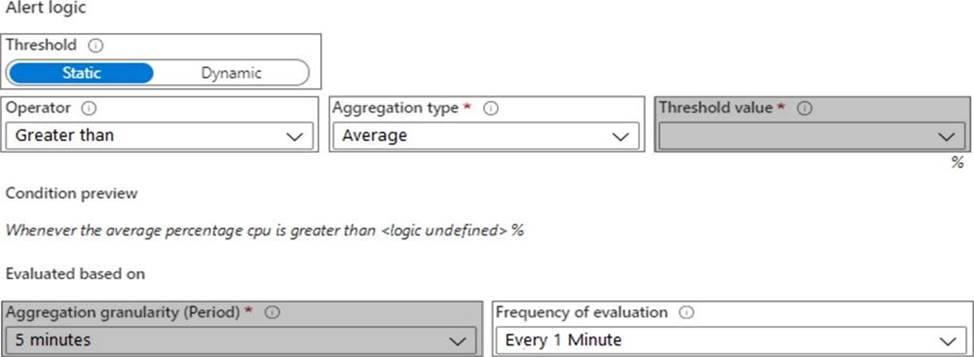
You need to configure the alert for VM1. The solution must meet the technical requirements.
Which two settings should you configure? To answer, select the appropriate settings in the answer area. NOTE: Each correct selection is worth one point.

Answer:


Explanation:
Graphical user interface, text, application
Description automatically generated
Setting 1: Threshold value
Set to 80 %
Scenario: An Azure Monitor alert for VM1 must be configured to meet the following requirements:
✑ Be triggered when average CPU usage exceeds 80 percent for 15 minutes.
✑ Calculate CPU usage averages once every minute.
Setting 2: Aggregation granularity
Set to 15 minutes.
Question 88 Written Answer
CORRECT TEXT
You plan to implement a CI/CD strategy for an Azure Web App named az400-11566895-main.
You need to configure a staging environment for az400-11566895-main.
To complete this task, sign in to the Microsoft Azure portal.

Answer: Add a slot
Question 89 Written Answer
DRAG DROP
You use GitHub Enterprise Server as a source code repository.
You create an Azure DevOps organization named Contoso.
In the Contoso organization, you create a project named Project 1.
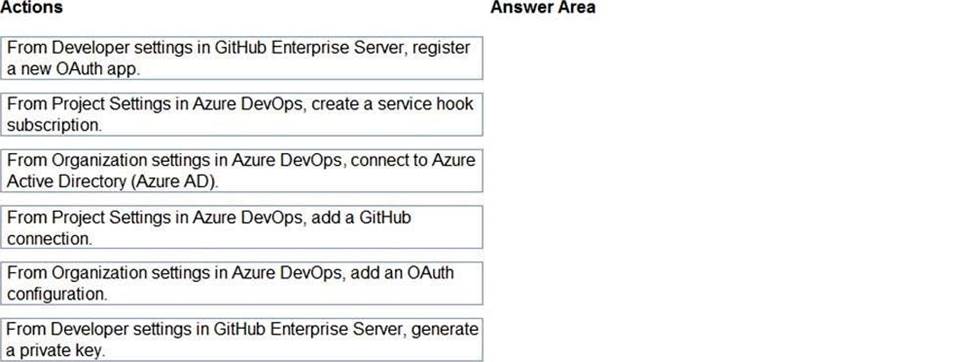
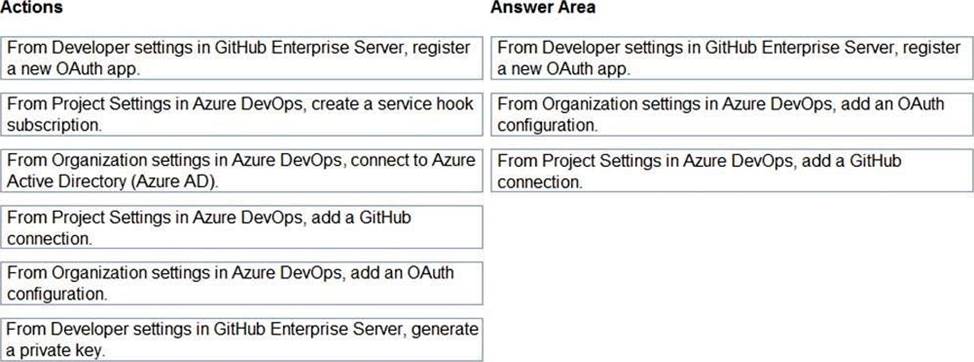
You need to link GitHub commits, pull requests, and issues to the work items of Project 1. The solution must use OAuth-based authentication
Which three actions should you perform in sequence? To answer, move the appropriate actions from the list of actions to the answer area and arrange them in the correct order.


Answer:


Explanation:
Step 1: From Developer settings in GitHub Enterprise Server, register a new OAuth app. If you plan to use OAuth to connect Azure DevOps Services or Azure DevOps Server with your GitHub Enterprise Server, you first need to register the application as an OAuth App
Step 2: Organization settings in Azure DevOps, add an OAuth configuration Register your OAuth configuration in Azure DevOps Services.
Note:
✑ Sign into the web portal for Azure DevOps Services.
✑ Add the GitHub Enterprise Oauth configuration to your organization.
✑ Open Organization settings>Oauth configurations, and choose Add Oauth configuration.
✑ Fill in the form that appears, and then choose Create.
Step 3: From Project Settings in Azure DevOps, add a GitHub connection. Connect Azure DevOps Services to GitHub Enterprise Server
Choose the Azure DevOps logo to open Projects, and then choose the Azure Boards project you want to configure to connect to your GitHub Enterprise repositories.
Choose (1) Project Settings, choose (2) GitHub connections and then (3) Click here to connect to your GitHub Enterprise organization.
Question 90 Written Answer
CORRECT TEXT
You need to create an instance of Azure Application Insights named az400-9940427-main and configure the instance to receive telemetry data from an Azure web app named az400-9940427-main.
To complete this task, sign in to the Microsoft Azure portal.

Answer: Step 1: Create an instance of Azure Application Insights
Showing page 6 of 18